Footer background is no longer transparent after Update

my website is

cosmicdiner.sg/cocotto/emenu

Before the update, everything is working fine, After the update, there is a background that can me seen on my footer and no matter how I changed and set in X PRO editor, it seems like the background is still there. May I know why is that so and I would like it to be transparent again.

Hey @peterok,

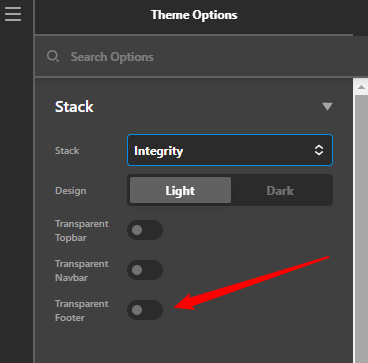
I see you’re using Pro 4.2.3. Please update to Pro 4.3.1 and also ensure Integrity Footer Transparency in Theme Options > Integrity is enabled

image

If that doesn’t help, please give us the following info in a Secure Note.

  • WordPress Login URL
  • Admin username and password

You can find the Secure Note button at the bottom of your posts.

Thanks.

Thank you, it has been resolved.

Hello @peterok,

Glad that we were able to help you. Please feel free to reach us if you have any query regarding our theme and theme settings.

Have a great day!
Thanks

For some reason, the same footer used in this page… Is not transparent.

Hi @peterok,

Please add this to Theme Options > CSS

.x-colophon {
    background-color: transparent;
}

But is that really the same footer? It seems it has a different text color?

Cheers,

This topic was automatically closed 10 days after the last reply. New replies are no longer allowed.