I added a footer to the template I’m using, but don’t see how to change the background color. Where is the setting to change this?
Hi @eutaw,
Please go to X > Theme Options > Renew and scroll down to find the Footer Background option:

Thank you.
OH WOW, don’t know how I missed that. Thank you.
Why is there white space above the footer? The section above the footer has a bottom margin of 0, so that is not causing it. How do I get rid of the white space?
Hi There,
Thanks for writing in!
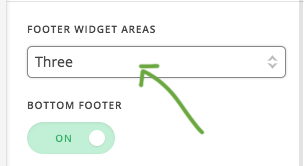
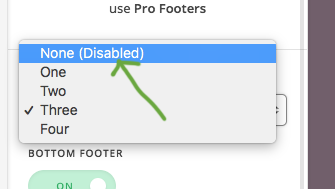
The white space is due to the widget area and you haven’t added any widget to it.
If you don’t want any widget in footer please disable it.
Go to Theme Option-> Footer make the changes ass screenshot.
Thanks
Thank you.
We are delighted to assist you with this.
Cheers!
This topic was automatically closed 10 days after the last reply. New replies are no longer allowed.