Font styling in Global Blocks overridden by global styling

Hi,

I am trying to create a section in Global Blocks with its own font styling, but the styling I am applying using cornerstone in Global Blocks is not overriding the global styling for the page.

Please take a look at the “Trial By Laughter” section on this page:

I have set the font size in Global Blocks to 0.95em, but the text is rendering at the global size I have set in Theme Options.

Is this a bug? Many thanks for your help.

Hi @outpost33,

Thanks for reaching out.

I just tried and it’s working properly in my installation. The CSS added through Global block’s custom CSS, and the font applied through the options are carried to the page where the global block element is inserted.

Or do you mean that the styling added to the global block should overwrite the CSS added in the page? It will not work since all styling added in global block’s builder are only applicable for that global block element. Though, with custom CSS, it should override if it the same class name and selector are used on the page.

Thanks!

It’s the second one: The styling added to the Global Block should overwrite the page styling.

So, for example, if I set the font size to be 0.95 in Global Blocks, that’s the font size I want to see on my page. Doesn’t this make sense? I need to see the styling exactly as I set it in Global Blocks.

This would be consistent with the way Cornerstone works in other situations. Text styling selected in Cornerstone elements overrides the page styling, yes?

What would I need to do to keep the styling I have applied in Global Blocks?

Thanks!

Hi There,

I’ve just checked your global block and the font size of text is 0.95em now:

I could see that you’re using the autoptimize plugin. Could you please temporarily turn off then check your website again?

Let us know how it goes!

@thai @Rad - yes, the font size is set at 0.95em inside Global Blocks itself, but it is not displaying at that size on the page on which the Global Block is used.

Any font sizes set in Global Blocks are overridden by the page styles. In other words, changing the font size in Global Blocks makes no difference to the sizes seen on the page on which the Block is used.

Disabling Autoptimize also makes no difference.

Hi @outpost33,

Hmm, a bit confusing. You said that you set the global block’s font to 0.95em which @thai and I are seeing on the page. Which means, the global block’s 0.95m is taking effect to the page as you wanted to be.

And I also tried that on my installation, the font size that I set within the global block is taking to the page where it’s inserted. Would you mind providing a video recording instead?

Thanks!

Hi @Rad,

Below are three screen grabs. The first two show how 0.95em text appears within the Global Blocks cornerstone editing page. The final one shows how it is rendered on the page.

As you can see, the text appears several point sizes smaller than it does when rendered on the page where the Global Block is used:

Something is definitely wrong here - one way or the other, what I am seeing within Global Blocks does not correspond to what I see on the page in terms of styling.

Thanks for your help!

Hi There,

Would you mind providing us with your admin account so we can take a closer look?

Thanks.

Sure, here you go…

Hi @outpost33,

Ah, I think I know what you’re referring. It’s because of EM unit, please check this out https://kyleschaeffer.com/development/css-font-size-em-vs-px-vs-pt-vs/

Basically, EM is a responsive unit where it changes according to its parent element’s font size.

So if the main page font size is 20px, then global blocks 0.95em rendering is 19px.

Please check this tool http://pxtoem.com/

Hence, within the global block builder, it appears to be smaller since its base font size is 16px instead of 20px which results in font rendering to 15px instead of 19px. The 16px base size is the size you set in Theme Options > Typography. Then another font size is applied locally to your page, and there is no way for the Global block builder to predict font sizes applied for each page, as it can’t predict what page it will be inserted.

It’s not a bug, it’s CSS standard. If you wish to see an exact font size regardless of view, then use PX unit instead of EM.

Thanks!

Hi @Rad,

This would make sense if the base font sizes for each page were different, but they are not.

The base font size is 16px globally, so if what you are saying is correct, then the font should render the same in both instances.

Have I missed something?

Hey Michael,

@Rad’s explanation is close but he just missed that the entry-content has a font-size which affects child elements using em based font-size units including your global block.

To get a 1 to 1 display, use rem unit instead. You can see the rendered px unit in the Computed tab of the element inspector.

For a better understanding of how rem unit works, please read https://j.eremy.net/confused-about-rem-and-em/

I’m not sure if this is a bug or intentional but I’ll post this to our issue tracker so our development team would be made aware of this case.

Thanks.

Hi @christian_y,

Thanks for the explanation, but I am unsure how I would implement what you are suggesting. Where would I make these changes? If this is custom CSS, could you provide some guidance?

Many thanks!

EDIT: sorry, I see what you mean now! You changed it to rem in Global Blocks!

You should change the text element in your global block. I have changed the setting for you previously. I forgot to say that though.

You need to do that to the rest of the text elements in your global block as well.

Thanks.

Yes just saw it - see my edit above. Messages crossed - thanks!

Hi @outpost33,

Glad it’s okay now, but allow to explain further as I intentionally skipped the base font size calculation. I only use the 20px size as a sample (after the root size + rem calculation). This is to prevent further calculation and a longer explanation which will be more confusing. As @Christian says, it still has a size of 1.375rem on that page.

The root font size is 16px regardless of the page, either the global builder or on that page. But given that page has 1.375rem, then 16px will become 22px. Please check this another tool https://www.ninjaunits.com/converters/pixels/rem-pixels/
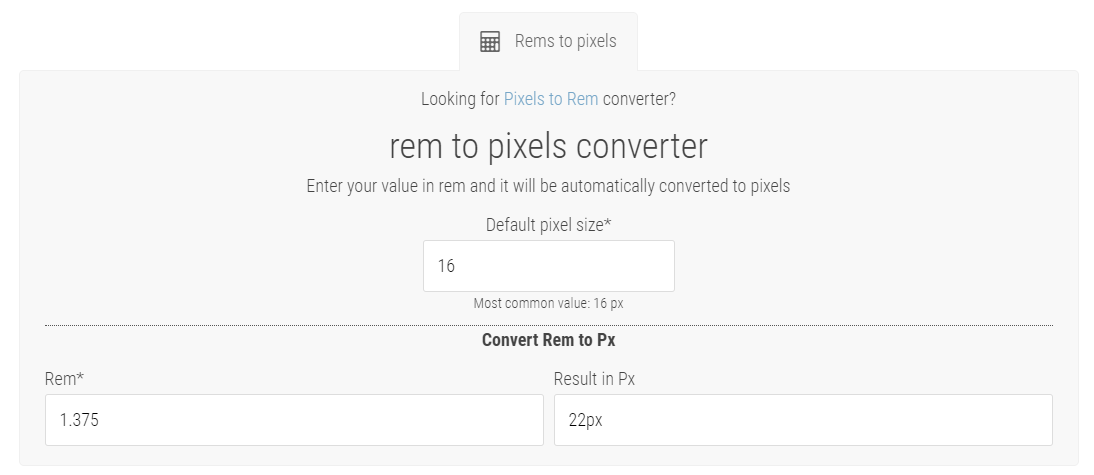
The root font size is just a base font where all local scaling font will be calculated from. I just made a sample of 20px to make the explanation shorter. Hence, in a page with 16px root size with content scaling size of 1.375rem, the base became 22px, so the 0.95em equivalent to that page is 20px.
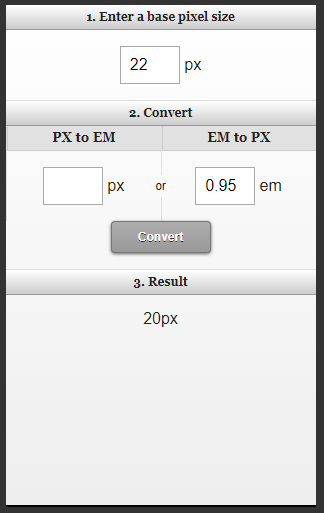
I also use the exact 20px as a sample instead of 22px so the change is noticeable and prevent confusion. Because when I add 1.375rem, it became 20px too.

While in the global block builder, the root size is still 16px without page local size of 1.375rem. Hence, the 0.95em of 16px is 15px. And it’s by 5px difference to the size you’re comparing.

But yes, you could also use REM as @christian_y recommended, or Pixel too if you wish to apply static sizes regardless of view. I just explained it to say it’s not a bug, and how EM works compared to other units :slight_smile:

Thanks!

Hi @Rad,

Thanks for your detailed explanation. But where is the content scaling of 1.375rem set? Is this an adjustable parameter?

Many thanks.

It’s from Theme Options > Typography > Content Font Size.

To sum it up,

  • em is relative to the nearest parent element that has a set font size so for this case, it will get the entry-content font-size. Theme Options > Typography > Content Font Size.

  • rem is relative directly to the HTML tag or the root. Theme Options > Typography > Root Font Size

This is the most important thing to understand first before the calculation because this is the reason why there is a difference in font size. As you can see in my previous reply, I did not touch the subject of calculation because I understand it might be confusing and it’s not the cause of the issue. Because I understand how this works, I simply pointed to the cause and a simple solution.

Hope that helps.

That helps, many thanks!

You are most welcome. :slight_smile: