I am trying to change the size of the text/font in the search form. It is possibly to do with search-query cfc-h-tx center-text tt-upper.
Can this be changed with CSS if not how can I do this?
Thanks
Hello @Foreverartificial,
Thanks for asking. 
You can add following CSS under X > Theme Options > CSS to change search form label font size:
.x-searchform-overlay .form-search label {
    font-size: 4em;
}
If you would like to explore CSS, please take a look at following resource:
Thanks.
Hi, thats great for changing the size of the instructions words ie “type and press” Im really after changing the size of the result of the search
Many thanks
Hey Shannon,
Please give us the URL of the page you’re referring to and also give us the screenshot of the text you are targeting so we could point you to an option in the theme or we might give you some guidance to help you get started.
Thanks.
Hi
Here is a screenshot. The URL for the site is www.foreverartificial.je
Thanks
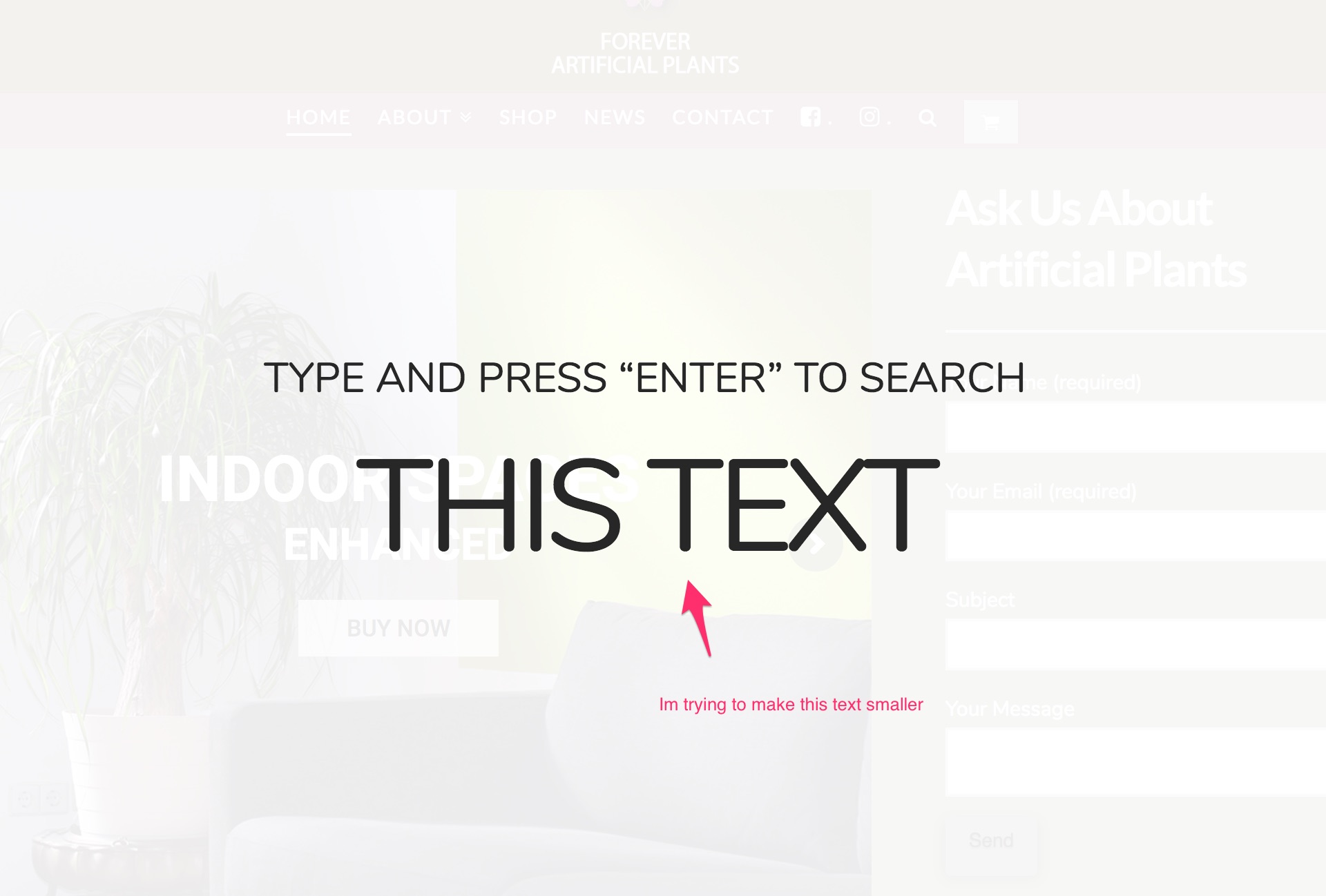
Hmm, a bit confusing. Is it the size of a search result or the input text in your screenshot?
Though, if it’s really the on in your screenshot then what you need is this CSS
.x-searchform-overlay .form-search .search-query {
font-size: 4em;
}
Thanks!
Hi that has done it. Many thanks
You are most welcome.
This topic was automatically closed 10 days after the last reply. New replies are no longer allowed.