Hi,
I wanted to ask a few questions about the text:
- How can I enlarge the distance between rows in all of the posts? Right now they are too tight if I don’t hit enter.
- How can I change the font for all posts?
Thanks,
Alon
Hi,
I wanted to ask a few questions about the text:
Thanks,
Alon
Hello Alon,
The points above actually depends on the setup of your site and could be addressed by some CSS code. I tried checking the licenses in your account but I can’t seem to find the domain of the site that is in question.
Would you mind providing it so that we can check and give you some suggestions?
Thank you.
Hi,
Thanks! Here is an example page:
As you see the text is quite tight.
Hi There,
You add the top & bottom margin to your containers:
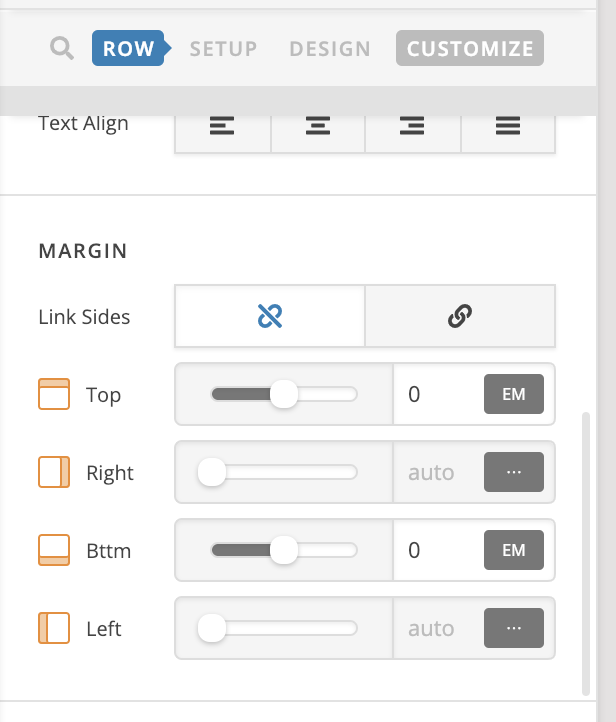
To change the font for the text elements, please inspect your text element under Text tab and change the font family under Text Format:
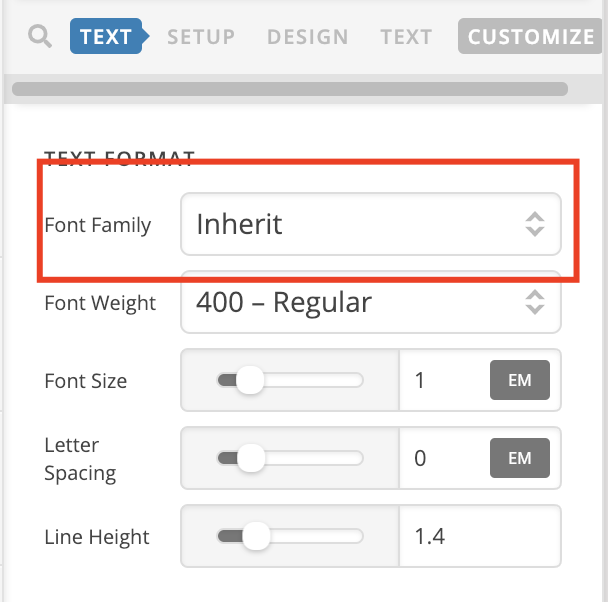
Hope it helps 
Thanks. RE: the line distance. I want the difference between the text lines to be larger, not the difference between the rows in the builder object. I’m thinking it’s line height, but I don’t want to need to update it every time. Any way to do it globally?
Hi @alonmg,
Thank you for writing in, you have a custom CSS that overwrite the default 1.8 line-height on your site.

I can’t tell where is that coming from though, actually, there are two instances of that, the other one is just above that on line: 209. If you can update that to 1.8 (or how much line-height you need) that would solve the issue.
But If you can’t find that either, please add this to Theme Options > CSS instead.
body {
	line-height: 1.8;
}
Cheers!
Hi,
The second option worked. Thanks!
Glad we were able to help you
This topic was automatically closed 10 days after the last reply. New replies are no longer allowed.
