Font not the same on cornerstone as frontend

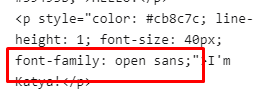
When using cornerstone the font for the words “I’m Katya” is displaying properly (open sans) but when I view it on front end, it is showing as another font. The first picture is how it should be showing (how it is in cornerstone) the second picture is how it’s actually showing on my browser. Any ideas? Thanks.

Screen Shot 2021-04-04 at 5.45.31 PM

Hey Greg,

I’m seeing the correct font on my end.

image

There could be something in your browser causing the font to look different. Please try clearing your browser’s cache and also try deactivating browser extensions if applicable.

If that is not the page, please give us the following info in a Secure Note.

  • Page URL having the issue
  • WordPress Login URL
  • Admin username and password

You can find the Secure Note button at the bottom of your posts.

Thanks.

`Hello.

That’s weird because I cleared my cache and also tried an incognito window and it’s still not working. I think you have the right page www.katyawarner.co/about

Any other ideas? I’ll give you my login in a secure note.

Hey Greg,

Thanks for confirming the URL. I see the issue only when logged out.

Your using a custom method of changing the font which is not good.

image

Please use our builder’s Font Manager feature and use the builder’s styling options also. See https://theme.co/docs/font-manager

Hope that helps.

This topic was automatically closed 10 days after the last reply. New replies are no longer allowed.