Font color heading (one word)

Hey,

In a custom headline I would like to change the font color of one word (it is a link, but it stays in the body font color and only accepts the link color, when hovering over).

Tried to add but the body font color seems to overrule it.

Any ideas?

Hello @conte,

Thanks for asking. :slight_smile:

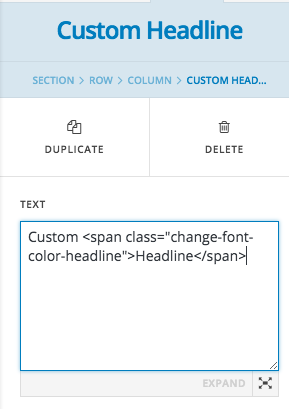
You can warp the text with using HTML Span tag and assign a class name. After that using CSS you can change the font color. Here is the sample Html and CSS code:

Custom <span class="change-font-color-headline">Headline</span>

span.change-font-color-headline {color: #ddd;}

You can change the class name as per requirement.

Thanks but it didnt change the color. Also added !important with on effect

Hi there,

Please provide the URL of your page so we can check it.

Thank you.

www.listepilz.at/spenden

talking about the word “Transparenzseite” on that page

Hi There,

Please update :

span.change-font-color-headline {color: #ddd;}

for

span.change-font-color-headline a {color: #ddd;}

Hope it helps

rocking. Thx

Glad we were able to help :slight_smile: