Hi-
On my website, the floating header bar is not full width as you scroll down.
Here is an example: http://www.swimmingscience.net/overtraining-in-elite-swimmers/
Please let me know how to fix, thanks!
Hi-
On my website, the floating header bar is not full width as you scroll down.
Here is an example: http://www.swimmingscience.net/overtraining-in-elite-swimmers/
Please let me know how to fix, thanks!
Hello @corsmash1,
Thanks for writing in! 
You need to set your navbar background to white in your header’s bar:
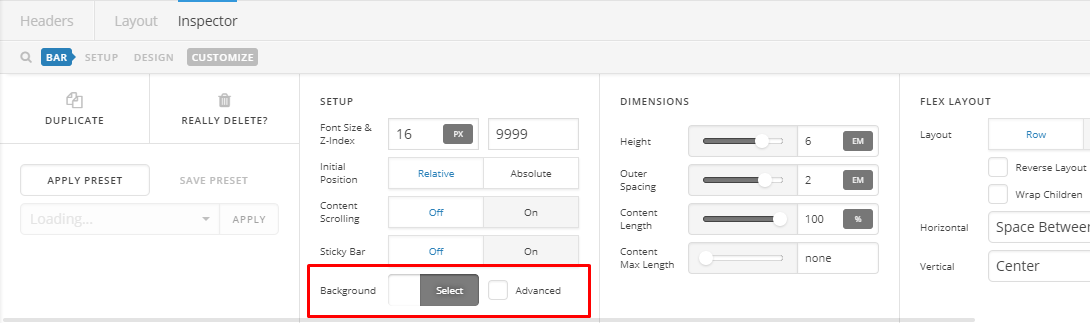
Kindly clear your Autoptimize cache afterwards.
Hope this helps.
Sorry, not so savvy here. How do I get to that page? Also, will that fix it for each post page?
Thanks!
Hi There,
You’re using the standard header with UberMenu, to turn off the transparency of your navbar please navigate to Pro > Theme Options > Integrity and turn off the NAVBAR TRANSPARENCY option.
Yes, this will take effect sitewide.
I see that you’re using an optimizer/minifier plugin, please clear its cache after you made the changes.
Cheers!
Perfect, thanks!
You’re more than welcome, glad we could help.
Cheers!
This topic was automatically closed 10 days after the last reply. New replies are no longer allowed.