Find on Page pushes mobile page left of margin

When I use the Find on Page function on the mobile site, the entire page will sometimes shift to the left and push the content left of the margin. This is the case when a found word is toward the right margin.

In the screen shot provided, I was at https://ohiofestivals.net/ohio-festivals/ and looked up the word “wine”

Upon the third matched word down, it created the shift.
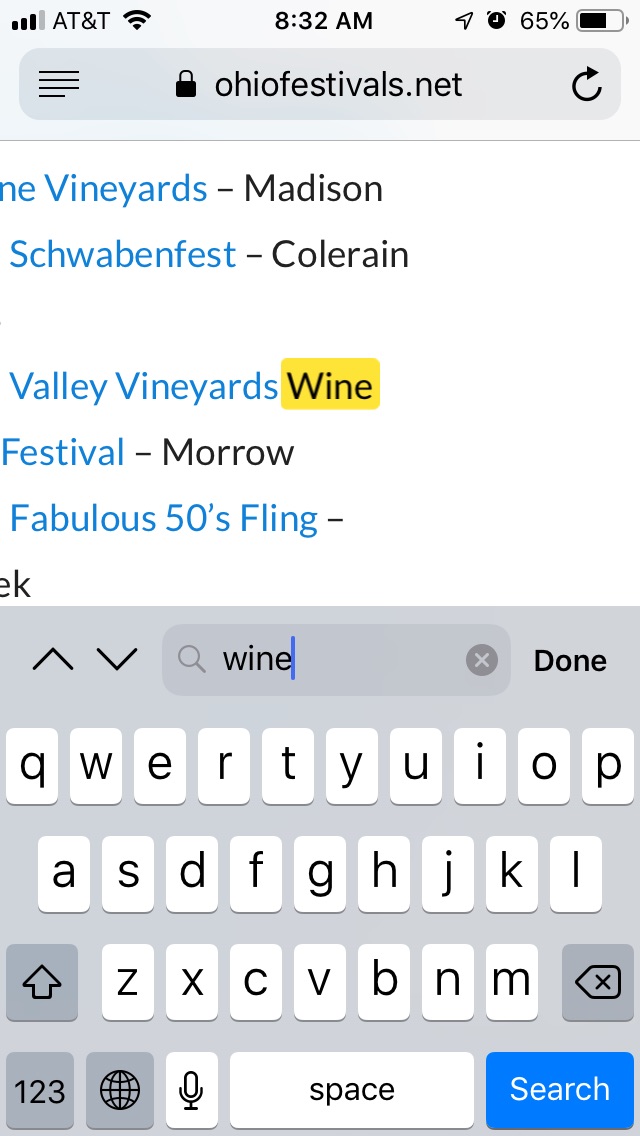
How can I keep the content onto the page and stop this shift?

Thanks!

Hello Kristian,

Thanks for reaching out. :slight_smile:

I tested the website on my mobile and I am unable to replicate the problem of text shifting on my end. Have recorded a screencast, please take a look. https://cloudup.com/cWMVaPAuW9V

I suggest you to try and clear cache and see how it goes.

Thanks.

Hi Prasant,

Thanks for trying.

To replicate the problem, you are going to need to use the arrows (do not scroll).

Also, you need a word that will be on the left of the screen.

Use the word “wine” and use the down arrow to find it.

Hopefully, either it will be a problem only with my phone or you will be able to replicate it and know a solution.

I appreciate the help.

Hello Kristian,

Thanks for updating the thread. :slight_smile:

I tried to replicate following the steps mentioned in previous reply but I am still not able to reproduce the issue on my end. Have recorded a screencast. https://cloudup.com/cEywApw1KWr

Can you please try it out on a different handset or a different browser?

Thanks.

Thank you. I will try someone else’s phone and see if it runs into similar problems or if it’s fine.

I appreciate you going through the steps and showing your results.

Let us know how it goes,

Cheers!

This topic was automatically closed 10 days after the last reply. New replies are no longer allowed.