Few Styling Questions

Hi there!

I would really appreciate some help with some styling questions please. We are using the x theme integrity.

I’ve used the built in footer and footer bar with copyright info but the footer is not sticky and I would like it to be sticky. Is it possible?

In the footer you will see we have Read More links with a little arrow, I would like to create specific styling for this read more link with the arrow so that it would change colour on hover. Can you help me to achieve this please?

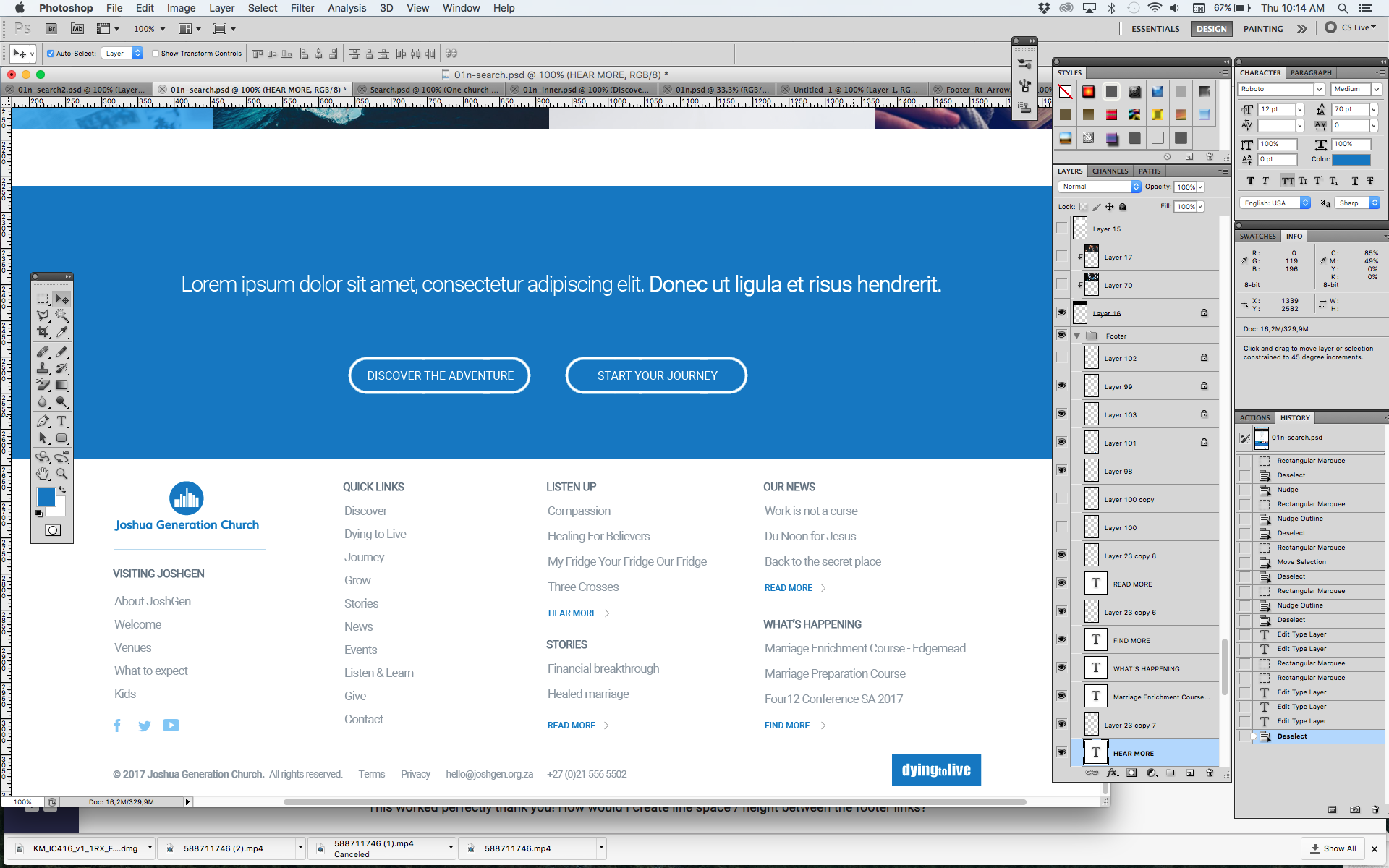
Then I was also wanting to add an image into the footer which would sit within the footer container on the RHS but anchored onto the grey horizontal line above the footer bar with the copyright info. I hope that makes sense.

Thank you so much,
Lisa
Hi There,

Sticky footer is not a featured offered by X.

It can be achieve with Pro easily.

Hope it helps

Thanks Joao, thats a pity!

Would you be able to help with the other 2 requests I made in my message?

  • In the footer you will see we have Read More links with a little arrow, I would like to create specific styling for this read more link with the arrow so that it would change colour on hover. Can you help me to achieve this please?

  • Then I was also wanting to add an image into the footer which would sit within the footer container on the RHS but anchored onto the grey horizontal line above the footer bar with the copyright info. I hope that makes sense.

Thank you for your help!

Hi,

To assist you with this issue, we’ll first need you to provide us with your URL. This is to ensure that we can provide you with a tailored answer to your situation. Once you have provided us with your URL, we will be happy to assist you with everything.

Thank you.

Hi, I’ve sent the url as a secure note did you receive that ok?

Hi there,

You can edit the code an add a common class to the read more links like this:

<a class="read-more" href="">READ MORE<img src="http://www.joshgen.org.za/wp-content/uploads/2017/09/Footer-Rt-Arrow.jpg"></a>

Then add this code in the custom CSS:

a.read-more:hover {
    color: #000 !important;
}

Would you mind providing a screenshot of what you mean by this so that it would be easier for us to get what you are trying to achieve?

Thank you.

This worked perfectly thank you! How would I create line space / height between the footer links?

Sorry how do I send you a screenshot?

Hi There,

On the toolbar above the box where you write, you have an arrow up, to upload, you can use that.

Hope it helps

Great, found it thanks!
If you look at the footer you will see the little blue image that says “dying to live” thats the one I’m looking to position.

Hi There,

I don’t see the “dying to live” button on actual page, please add it first if it is an image you can place it with the img html tag below, and we will position it with custom CSS.

<img src="IMAGE URL HERE" />

Thanks,