
When I upload an featured image, it appears very big on the post thumbnails on home screen. I want to make the featured image small er and put it next to the post heading. Please help…
Hi @Prabhath,
Thanks for reaching out.
You can utilize he Ethos stack for that kind of layout, please check a demo here https://demo.theme.co/ethos-1/. And please check more about stacks here https://theme.co/docs/stacks
Thanks!
Wow! Perfect. How can I get this ?
Hi Prabhath,
Please go to your X > Theme Options > Stack then select Ethos from the option.
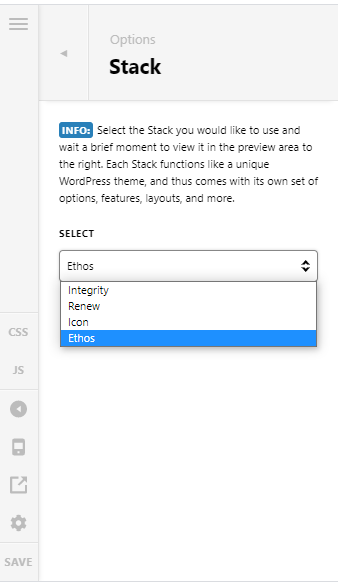
Hope that helps and let us know how it goes.
Thank you.
Thank you so much! You guys are awesome.
This topic was automatically closed 10 days after the last reply. New replies are no longer allowed.