Pretty much as stated in the headline. When I create a Blog post, I am not able to assign a Featured Image. The option is there but when I click on it to go to my Media Library and click the image I want to assign, nothing happens. The image does not appear as assigned and it is not present on my blog post on the page.
Hi @jbutler97,
Thanks for writing in.
I could see that there is a featured image div but no image assigned.
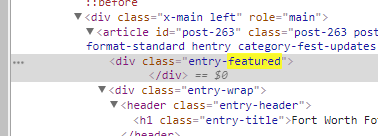
In this case, please share us your admin credentials so we could check your setup closer.
Don’t forget to set it as private reply.
Thanks.
Credentials Below
Hi there,
Thank you for providing the login information. I went to Settings > General and turned off the Endurance Cache for testing purposes, and then disabled all plugin and checked the case and it worked with no problem. You can check the blog page now and you will see the featured image.
I re-activated all plugins. Please deactivate all again and activate them one by one to find out the plugin which is causing this issue.
Thank you.
I went through each plugin and it appears that the Sponsors Carousel plugin is the culprit. What do I need to do to correct this?
Hi there,
You can keep the plugin deactivated or remove it as there is simply no way to account for all of the potential variables at play when using another developer’s plugin or script. You can try searching for an alternative plugin or you can use Revolution Slider to create a carousel, see https://www.youtube.com/watch?v=b5YAjR7x5gg
Thank you for your understanding.
This topic was automatically closed 10 days after the last reply. New replies are no longer allowed.