I have added the bbPress plugin to url digido.com, ensured “Allow users to mark topics as favorites” in Setting>Forums and the Favorites Button does not display anywhere (Forums Topics or Replies). I have already tried disabling plugins to no avail. I have tried some plugins to solve this problem like bbp Style Pack but that did not help. I have looked for an answer on this Forum and the web and cannot find an answer. I can provide credentials if necessary.
Hey @hardimanja,
I have replicated this on my site. It looks like Pro does not currently support the bbPress Favorite feature. I’ll post this in our internal tracker to let our development team know about this case and so they might add the Favorite feature in one of the succeeding updates.
Thanks for reporting.
Christian, thank you for the reply. In that case, how can I remove “Favorites” from the Nav Bar menu generated by Pro when I select that option in the bbPress Section of the Theme Options. It does not make sense to display the option in the menu if it is not supported. It just makes users ask how to make Favorites. Jim
Hello Jim,
In order to remove the “Favorites” buttons you need to go to the Theme Options —>BbPress ---->Navbar Menu, you need to disable the toggle from here to get rid of the button which is showing on the menu. Please have a look at the given screenshot below.
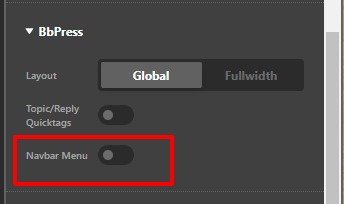
Hope it helps
Thanks
Thank you for the reply. That does not solve the issue. I wanted the menu, but wanted the Favorites removed. If I toggle that button off, I lose the whole menu, not just Favorites. I have solved this in another way so we can consider this solved. Thank you for your help. Jim
You are most welcome, Jim.
This topic was automatically closed 10 days after the last reply. New replies are no longer allowed.