Hi, my Facebook page plugins do not work. They show well in Cornerstone view, but they show only code in real view. How do I solve this? The plugins are at:
http://traditions.wine/
http://traditions.wine/service-en-contact/
Thanks,
Christiaan
Hi, my Facebook page plugins do not work. They show well in Cornerstone view, but they show only code in real view. How do I solve this? The plugins are at:
http://traditions.wine/
http://traditions.wine/service-en-contact/
Thanks,
Christiaan
Hello Christiaan,
Thanks for writing in!
I tested the iframe script that’s showing on your website using Raw Content and Text element, on my end I can see the page getting loaded. https://cloudup.com/cXIw2HmRXsE
I see that you are using text element. Please make sure that you are adding the script in code view not using WYSIWYG editor.
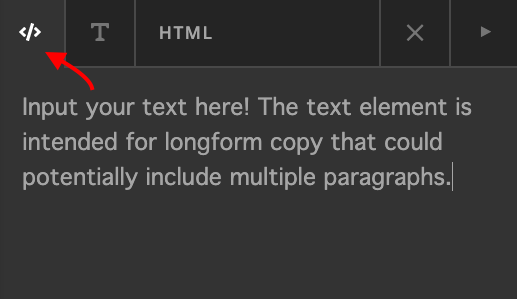
Thanks.
Hi Prasant,
Sorry, I really do not know what you mean. I do not recognize your screenshot. I used the classic code snippet element to insert the code. When I use a text box element, I do not see an option to switch from wysiwyg to code view.
Can you help me out here?
Gr. Christiaan
Hello Christiaan,
Thanks for updating the thread. 
Please don’t use Classic Code Snippet. Instead use Raw Content or Text element to display the Facebook page. Here’s a screencast that you can refer. https://cloudup.com/cAUr0ogn3HK
Thanks.
This topic was automatically closed 10 days after the last reply. New replies are no longer allowed.