Export navbar on a plugin page

Hi,

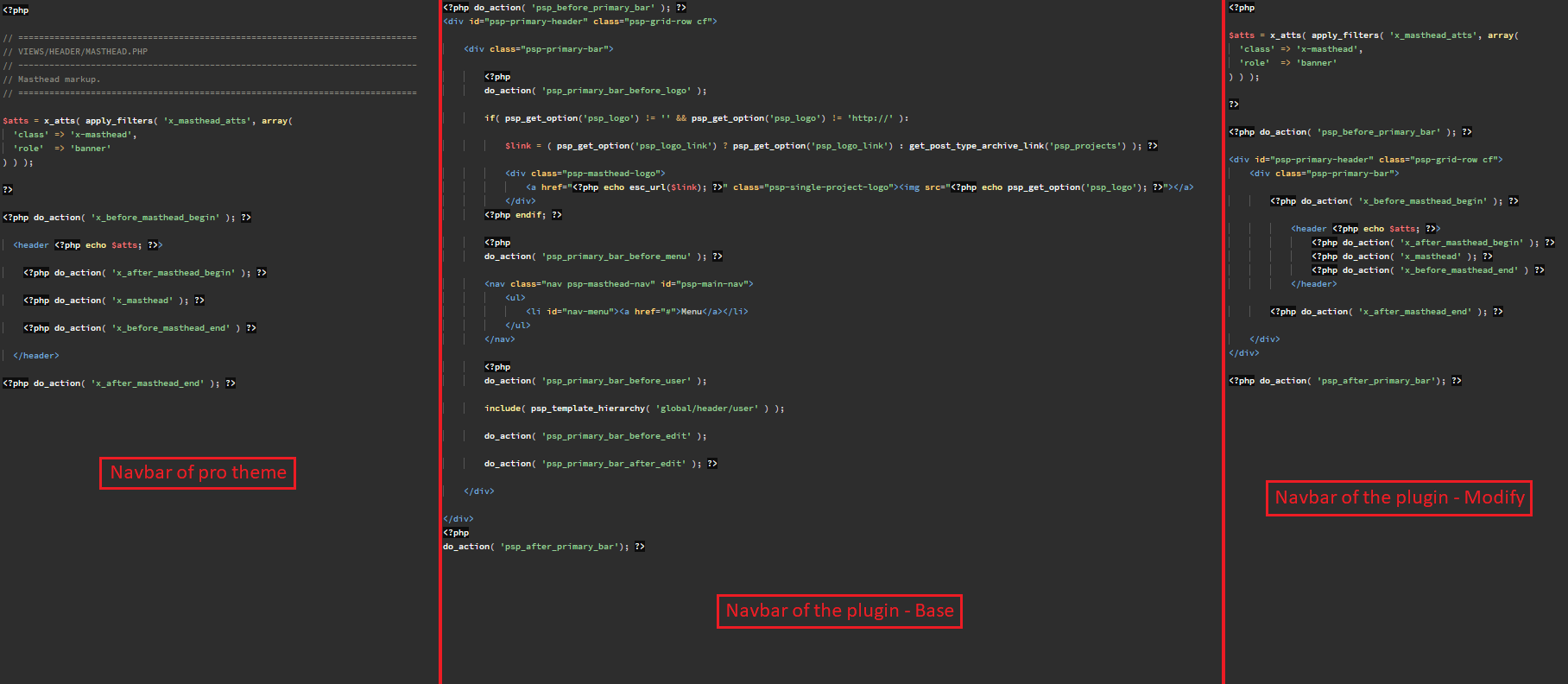
I try to integrate the navbar of the pro theme on a plugin page but I have some problems :

Picture on full screen : https://tco-forum-uploads.s3.amazonaws.com/original/3X/1/1/11bf678677ac55799c30b1f4257030c45d7de6d2.png

As you can see on the screenshots, the visual of the navbar is broken on my plugin page.
Maybe I do something wrong ? Else how I can fix this problem ?

Thanks !

Hi @Lecoqdigital,

I guess the header has been wrapped with the <div id="psp-primary-header"> element so all the CSS code is not working.

Try removing all the div elements and just put this code:

<?php do_action( 'x_before_masthead_begin' ); ?>

  <header <?php echo $atts; ?>>

    <?php do_action( 'x_after_masthead_begin' ); ?>

    <?php do_action( 'x_masthead' ); ?>

    <?php do_action( 'x_before_masthead_end' ) ?>

  </header>

<?php do_action( 'x_after_masthead_end' ); ?>

Let us know how it goes!

Yes sorry I did not specify but I have already try this method (and others), the result as the same it’s doesn’t work

Hi @Lecoqdigital,

Is there an online intruction of how the plugin navbar should be integrated? Maybe I can find something from there. I’m not fully sure how you placed it and if you modify the entire header for the integration then it may not work since the filter required for javascript and CSS to load for the header are removed as well.

Thanks!

Yes sure @Rad !
This is the plugin documentation concerning customization of header/footer :

http://docs.projectpanorama.com/knowledge-base/advanced-appearance/#using-your-theme-template
(With this method the footer is correctly displayed, the navbar too but I do not can modify the nav and I need to customize menu on the plugin page. This feature is in beta and has some bugs).

http://docs.projectpanorama.com/knowledge-base/menus/#adding-links-to-panorama-menus
(With this method the added elements are integrated on the plugin menu. That’s not what I need).

That is why I would like pass by the code.

Hey @Lecoqdigital,

I’m sorry but the instruction provided in the documentation are quite general or not specific. I’m also not familiar with the Panorama plugin so I’m not the best person to help you with this. What you will need is someone who has experience customizing the Panorama plugin and also X and Pro. We do not have such a person here and as you might already know, third party integration is beyond the scope of our support.

Here’s a section in our Terms that is related to this case.

###THIRD PARTY PLUGINS
Customers are certainly welcome to extend the functionality of their site with the use of third party plugins, however our policy is that unless they are integrated into the theme in some way or explicitly listed as supported (Extensions), then we can not provide support or guarantee compatibility. The implementation, customization, and troubleshooting of any issues that may arise are the responsibility of each customer. Technically speaking, since our products developed according to development best practices, any well developed third party plugin should play nicely, however due to the virtually limitless nature of things that can and often times do go wrong with software, we can’t support something that we have not first developed or integrated into the theme. For plugins that are integrated into the theme, support covers product related questions (no customizations).

I understand that this is disappointing but I hope you’ll also understand our side. Third party integration is a premium service which we currently don’t offer.

Thank you for understanding.
This topic was automatically closed 10 days after the last reply. New replies are no longer allowed.