Even boxes!

HI There

I’m having some issues with my homepages
For some reason the 1st 2 boxes and 2nd 2 boxes don’t match up at the bottom
X Theme > Cornerstone > Essential Grid is being used.

See www.securespot.com.au - homepage - scroll down to 4 boxes with bollards / blog.

Any help would be appreciated.

Thanks
Suzy
Hi Suzy,

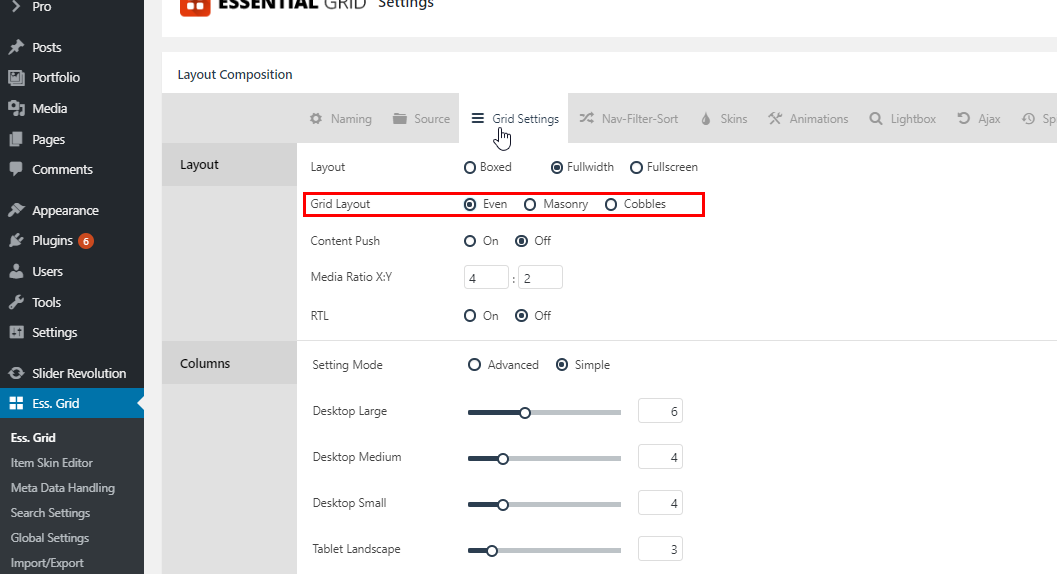
Thank you for writing in, please edit your Essential Grid and under the Grid Settings set the Grid Layout to Even.

More about Grid Layout here

Hope it helps,
Cheers!

HI Friech

Thanks for your response. If I change the grid to “even” it gets rid of the content underneath and makes all the photos even (which they already are). There is an option to push content, which make the boxes appear when hovered over, yet the bottom of the boxes are still different so I don’t think this is the answer.

Any other ideas?

Thanks
Suzy

Hi Suzy,

Thank you for the clarification, Masonry is really designed that way (item height depends on media height and content height). It’s still possible for a Masonry layout to have even items though but it will require skin editing.

Even Sized Grid Items with a Masonry Layout

It’s not mentioned in the video, but you also need to reduce your title font-size as the Remote Control Bollards is getting wrapped.

Customize the look of your Essential Grid Items with the Item Skin Editor.

Cheers!

1 Like

Thanks so much - will test this out tonight and report back!
Suzy

Hi Friech

Thanks so much for the additional info; my images were even, just not the excerpt and so I just had to change the limit by words number and now it’s all even!

Very pleased, thank you for the support

Suzy

You are most welcome. :slight_smile:

1 Like

This topic was automatically closed 10 days after the last reply. New replies are no longer allowed.