Estimation & Payment Forms latest update conflicts with autoptimize

I have just updated to the latest version. Unfortunately, it has broken the working of the plugin.
Trying to downgrade to a previous version did work, but unfortunately, all forms were gone!?

Importing a previous backup of the forms database did not return the forms…
Updating again to the latest release did bring back the forms but also the issue.
I have tracked it down to some kind of conflict with autoptimize.

When switching off “Aggregate CSS-files” the plugin works again, this is of course not a solution.

Can you please check the latest update for compatibility with autoptimize. I tried to contact the plugin author directly but he rejects support for our version that came with the X-theme.

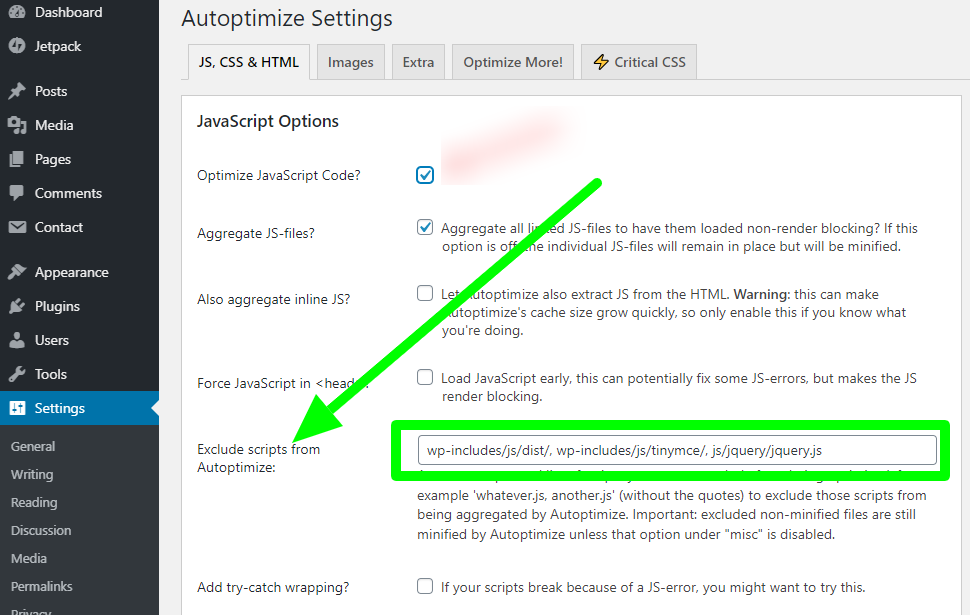
Hello @ruudvanbeek,

Thanks for writing to us.

It might be the issue of cache or minified JS/CSS issue. I would suggest you purge all the cache and then check it again. It would be best if you could check it in the private mode of the browser. I would recommend you must troubleshoot few common issues with our troubleshooting guide.

It would be best if you could copy your live site to a staging server so we could troubleshoot freely without breaking your live site. Please note we can’t guarantee a fix we’ll be interested to know the root of the issue. Please remember that we don’t provide any third-party plugin support. It is out of the support scope.
And give us access in the secure note including:

– WordPress Site URL & Login URL
– WordPress Admin username/password

To create a secure note, click the key icon underneath any of your posts.

Thanks for understanding

@prakash_s thanks for your response. Did you see the essence above? All standard things have been done, caches etc. The conflict is clear as stated.

Simply create a form and activate autoptimize with “Aggregate CSS-files” ON, the form will no longer work.

Hi @ruudvanbeek,

It seems that my colleague is quite correct that the issue is related to the minification of the CSS/JS files, I would suggest you exclude the specific JavaScript and CSS files to minify, please find the screenshot describing the option.

Hope it helps.
Thanks

Hello @tristup

Sorry for my delayed response.

Yes, of course, it is related to minification I pointed that out from the start. What you suggest now is a workaround, which is fine at this time and I will test it.

This however is not the cause for the issue. The latest plugin update via Wordpress created this issue, therefore it is NOT an autoptimize issue but it is caused by the latest “improvements” of Estimation & Payment Forms.

Hi @ruudvanbeek,

The plugins have mostly added the code using its own set of CSS and JavaScript files. And due to the minification it has been combined into a single file as minified and the plugin will not be able to locate the file to load the styling or script and that is why you are facing this issue. I would suggest you go with the solution given in previous posts, I will check and report the issue to the developer if anything found related.

Thanks

This topic was automatically closed 10 days after the last reply. New replies are no longer allowed.