Essential Grid Post Feed breaks when new post added with Pro

Ok this issue is driving me nuts!! I’ve been able to isolate it down to any new post published that uses Pro as the editor.

The blog page here breaks as soon as I publish any new post:
http://www.jaimemintun.com/blog/

If I publish a post using the visual or text editor, everything is fine. As soon as I save anything in Pro, the blog feed breaks.

I thought it might be a memory issue. I updated my wp-config.php file to have a memory limit of 256 and a max limit of 500+

Then I thought it might be a conflict with my security plugin, but in deactivating it, the same issue was still happening.

I need to add/publish new posts to my blog in the next 24 hours so please help!!

Thank you!!

Oh and please note that I have deleted the most recent Pro post that broke everything, so right now the page is displaying properly. Also note that I tried creating different types of posts with different publish dates and different types of content to see if it made any difference. The key difference is doing ANYTHING in PRO and saving it. That’s what breaks Essential Grid’s blog feed {yet it doesn’t break the other Ess. Grid category feeds, probably because they only have a few blog posts each.}

Hi there,

Thanks for writing around! This might be due to the cache plugin you’re using, I think there is server cache as well. Make sure to purge all cache (plugin’s cache and hosting cache) and deactivate all optimization plugins and see if this resolves the issue.

Let us know how this goes!

Which caching are you referring to? I deactivated Wordfence and the issue was still present. My cloudflare account has been on pause forever. I know of no other caching and I purged the cache via wordpress several times and still had the issue.

I’ve once again purged all cache in wordpress, deactivated caching in wordpress main settings, and deactivated wordfence plugin. Cloudflare CDN is also, and has always been paused.

Still need help!!!

Hi there,

Thank you for the information as you already purged the cache we can rule out that cause. We need to give you suggestions one by one to be able to find the root cause of the issue.

One possible cause might be that the shortcodes which are generated in the Pro Editor cannot be handled by the Essential Grid. I suggest that you add the new post using the Pro Editor, Then on the normal edit screen of that post click on the Screen Options option at the top right section and enable the Excerpt box:

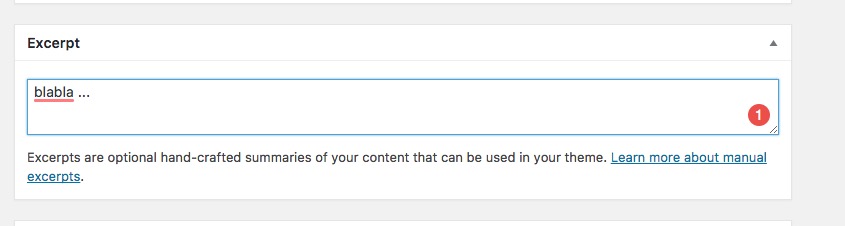
Then a box will appear at the bottom of the screen, add whatever text you want to show in the grid there:

Then go to X > Launch > Options > Blog and make sure that the show full content option is turned off.

That will cause to have only simple text in the listing instead of the complicated Pro Editor shortcodes for the Essential Grid and that should render correctly.

Thank you.

Oh my goodness, I LOVE YOU, THANK YOU!!! I never would have thought of that and you were totally right - all my other posts already had excerpts created. Once I added that (full content was already disabled) that fixed the issue right up.

I can’t thank you enough. All of you are always so prompt answering my questions and fixing my issues but this one was terrifying for me and a huge freeze on any of my future work with my site.

So grateful and sending you and the whole team tons of appreciation!!

1 Like

Thank you for your kind words :slight_smile:

Glad we could help!

This topic was automatically closed 10 days after the last reply. New replies are no longer allowed.