Essential Grid not showing all posts

Hello,

My essential grid is only showing 7 posts, despite there being 8 posts in the given category. The max entries option is set to -1, max visible rows is set to 99. I’ve tried tweaking settings, recreating the post that isn’t showing, deactivating recently installed plugins… all without luck. Please help.
I’ve also realized it’s no longer alphabetizing correctly… Additional parameters are set to “order=ASC&orderby=title”

Fixed the first issue of it not showing all posts. It seems like there was an unclosed in some meta data. But still having the alphabetizing issue. All of the posts are alphabetized correctly except for this one new post. Any ideas? Does it have to do with the masonry layout?

Hey There,

Would you mind providing us with login credentials so we can take a closer look? Please provide following information:

Set it as Secure Note

  • Link to your site
  • WordPress Admin username / password

All the best!

Hi Joao, thanks for getting back to me. I realized it’s alphabetizing correctly, but arranging in a goofy way due to the masonry layout. I’ll try to explain this well…

Basically, since different grid items are different heights (due to varying content size), they are arranging in a sort of cobbled effect, rather than each grid item being the exact same height and therefore creating straight rows. I realized it’s arranging a-z based on the location of the top of each grid item. Does that make any sense at all?

This is the page in question: https://www.seventy48.com/teams/

Hi ,

Thanks for clarifying.

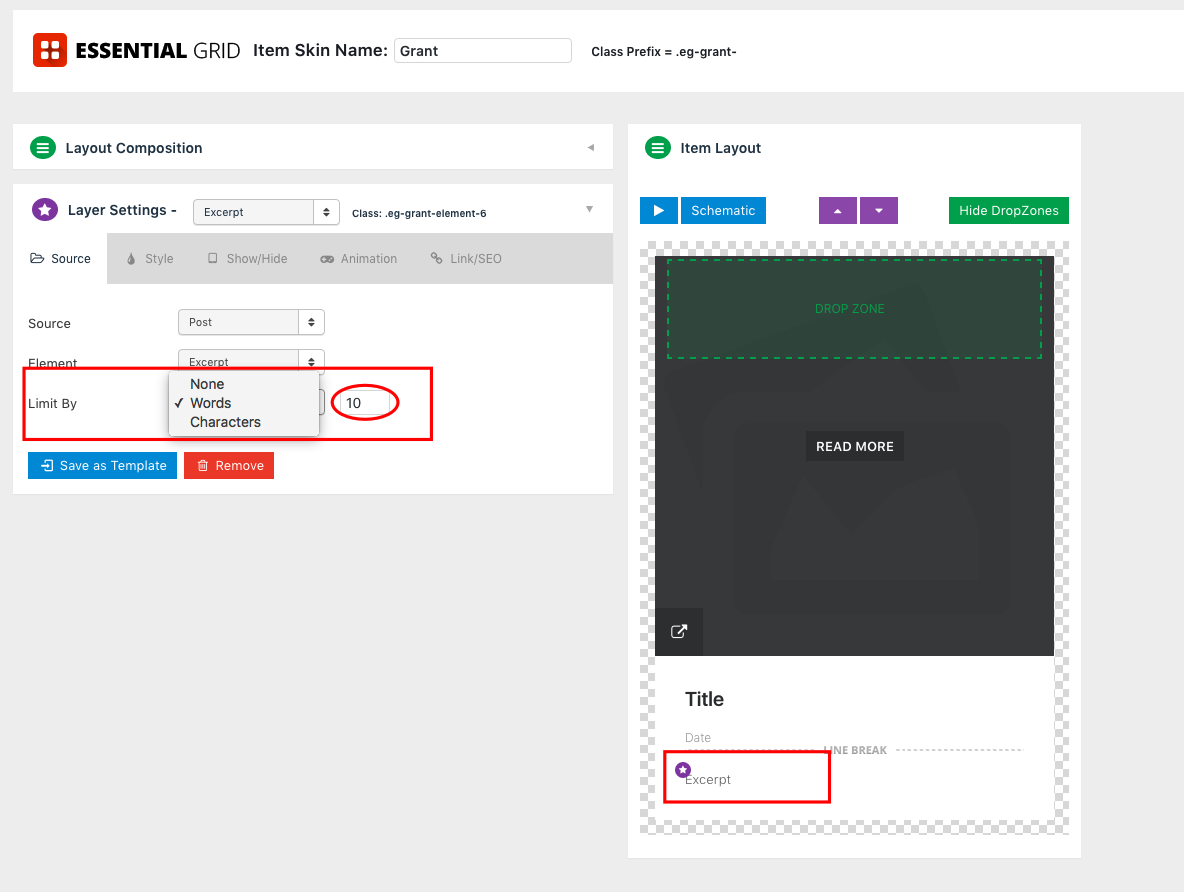
To know how you can customize the excerpt lengths in Essential grid, you simply need to edit the grid skin, click on the excerpt layer and set the limit. Please check out my screenshot below:

That way your grid will look as expected.

Hope it helps

This topic was automatically closed 10 days after the last reply. New replies are no longer allowed.