Essential Grid / Masonry layout help

Hi there,

I have a site here:
http://www.budagastropest.com
Where I’m trying to build an EG MASONRY GRID, that resembles this:

This part to be exact:

I tried following this guide to set a max-height to the images, but the guide seems to be outdated. Could you help?

Thanks!
Hello @Pbalazs89,

Thanks for writing in!

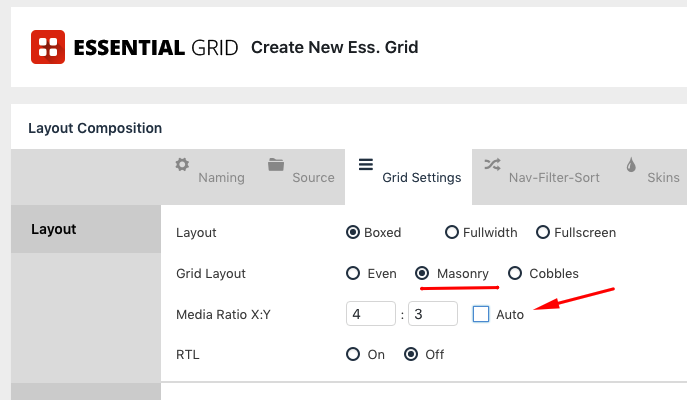
To resolve your issue, please edit your grid and make sure that Masonry layout is set in your grid settings.

Media ratio must also be enabled so that your featured images will have the same heights. For more details, pelase check this out:

Hope this helps.

Hi there,

I tried this, but unfortunately it was already turned on. So it did not fix the issue. Is this a bug?

In the preview, it looks fine…ish: https://www.dropbox.com/s/qb4athutcjcqvq1/Screenshot%202019-07-15%2012.29.34.png?dl=0

I’ll add a login.

Hey @Pbalazs89,

Ruenel meant that it should be off like in his screenshot. The Auto option will actually use the aspect ratio of the image.

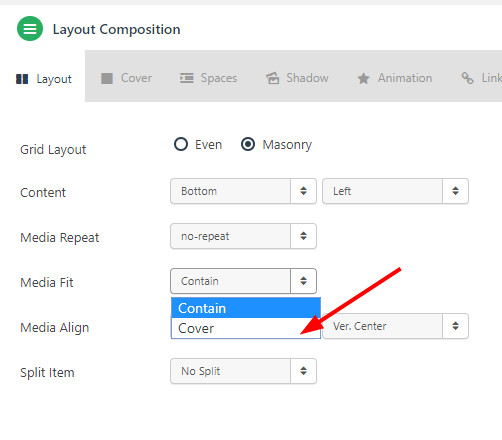
There’s another setting that you need to set or ensure that is set and that is the Media Fit option under the Layout tab in the Item Skin Editor. Make sure it’s set to Cover. Please understand though that your images will look cropped. There’s no getting around that.

Also, remove the description above your grid items as it covers the images making them look out of proportion.

Hope that helps.

This topic was automatically closed 10 days after the last reply. New replies are no longer allowed.