Essential Grid Example Posts Missing

With the latest release of the Pro/Essential Grid bundle it seems the Ess. Grid Example Posts menu item (and all the associated posts) disappears and breaks any grids which used posts located in the Example Posts section of the menu.

I have multiple Pro sites which have grids that will break if I update Essential Grid to version 2.3+.

Here is the menu item I’m referencing:
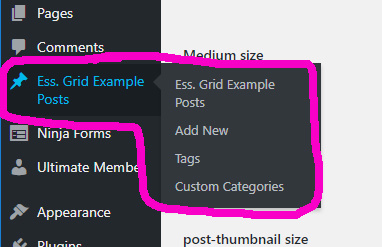
Is there a solution for this beyond not applying the latest updates for Essential Grid?

This issue is mentioned in this other support thread as the #2 issue but never addressed, instead the person who submitted the issue restored from a backup to get the Ess. Grid Example Posts menu back. When they eventually apply the latest updates the issue will occur again.

Update: I found a solve. If I go into the Essential Grid Global Settings and turn off “Enable Example Custom Post Type” then turn it back on the missing menu item is restored.

Hello @jasonixr,

Thanks for the very detailed post information. Please be informed that Theme.co does not and will not modify any 3rd party plugin bundled in the theme. The essential grid you installed in X > Validation section is the same version when you purchase and download the plugin from it’s creators. There was no modifications what so ever in the plugin as you have downloaded it from our Theme.co plugin repository for bundled plugins.

Can you please confirm that you have updated to the latest versions?
Our latest versions are:

  • Pro theme 2.4.6
  • X theme 6.4.6
  • Cornerstone 3.4.6
  • Essential Grid 2.3.1

This latest release contains fixes for several issues so be sure to check out the changelog (http://theme.co/changelog/).


We are just glad that you have figured it out a way to correct the said issue.
Thanks for letting us know!

Best Regards.

This topic was automatically closed 10 days after the last reply. New replies are no longer allowed.