Enlarging text in cart

Hello!

Recently someone gave me a code to enlarge the text in my cart page and it worked great.
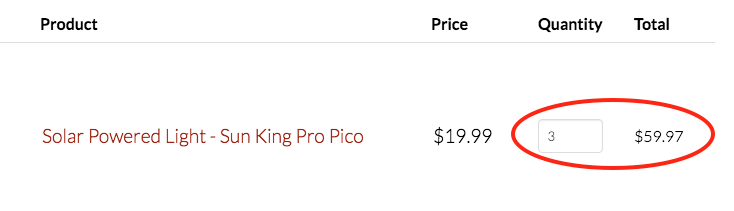
I was wondering if you could give me the code to enlarge the circled text to match the other.

I hope my question makes sense. :slight_smile: I believe the “Solar Powered Light… $19.99” part is 1.2 em.

Thank you so much!
Hi Nadia,

Thank you for reaching out to us. To increase the font size of other fields to match with Price columns please add the following code in the Theme Options > CSS:

.woocommerce-cart .woocommerce .quantity .qty {
    height: 2em;
    font-size: 1.2em;
}
.woocommerce-cart .woocommerce .product-subtotal {
    font-size: 1.2em;
}

Here are some related links for further reading, this could help you in finding and implementing some CSS fixes:

Don’t forget to clear all caches including your browser’s cache after adding the code. Let us know how this goes!

It worked perfectly!

Thank you so much :slight_smile:

You’re welcome!
We’re glad @Nabeel were able to help you out.

This topic was automatically closed 10 days after the last reply. New replies are no longer allowed.