Enlarge Section/to show picture with 800px

Hello,
how can I enlarge section elements to enlarge the pictures (e.g. background pictures) to 800 px.
In Youtube tutorials, I saw the customization with Inline CSS

In my theme, I could not find any feature to enlarge the pictures.
Could you advice?

Regards
Güldem

Hey Güldem,

Do you mean you’re not seeing the Inline CSS field? Is that screenshot taken from your site or another user’s? If so, would you mind providing us a screenshot of what you’re seeing on your end?

Basically, you’d want the elements in your section to be taller. For example, try adding a Gap element with a height of 100px in your section and you should see that the background image of your section will expand or zoom in.
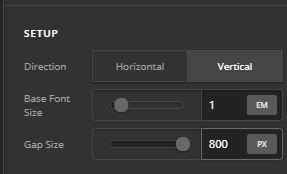
Please note that using the background image is not always ideal because it’s designed to always cover the section and the section’s aspect ratio can change depending on the flow of the content within it. That will result to parts of your background image to be hidden. If you want to show all parts of the image, it’s best to use the Image element.

Thanks.

Dear Christian,
my intention was to use a background picture and to add elements (e.g. button, link etc) onto the picture, like this example:

I followed your advice and used the element IMAGE, but I do not know how to change the size of the picture (e.g. if I would need exactly 500px.) Additionally, I can not ad any other element (like a button) on the surface of this background picture.

Many thanks in advance
Güldem

Hi Güldem,

If there are other elements (button, text, etc.) involve, yes having your image as a background is the way.

To add a min-height: 800px; to your Section’s Inline CSS, please inspect your section under the customize tab, add min-height: 800px; on the Inline CSS field


Hope it helps,
Cheers!

This topic was automatically closed 10 days after the last reply. New replies are no longer allowed.