Embedded inline menu dropdown hidden under next section

How do I make sure the dropdown on an inline menu embedded in the middle of a page show above the content that is underneath it? (See photo) The dropdown shows up, but underneath the next section. I’m not having this issue with regular headers, just the inline menu elements in page sections. I only need this functionality across two or 3 pages, not global.

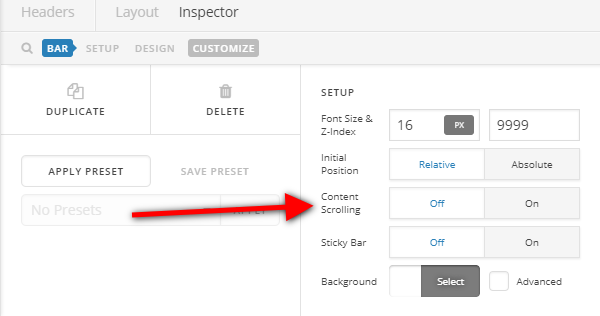
Hi there,

Please edit the Bar settings and disable the Content Scrolling option.

Hope this helps.

No, that doesn’t help. Sorry! This is an inline menu embedded in the middle of a page as an element. I don’t see that option in the customization settings for that unless I’m in the header customization, but this is not a header.

Is there any way to fix this in the middle of the page, or just in the header section?

Hi there,

In that case, please provide your site’s admin login credentials in a secure note. It’s behind a coming soon page and I can’t check it.

Thanks!

Okay Thanks!

This is on the SimpleRepayment.com/Resources page

Hello There,

Thanks for providing the information.

By default, each of the sections has a z-index of 1. And the section will display on top of the other. To make sure that your menu and its submenu will display on the very top, you will need to set the z-index of the section containing the menu to at least 10 or higher depending on the number of sections you have.

I went ahead and edited your page. I click the section containing your menu and inserted an inline css in the customize tab.

I would highly recommend that your disable your caching plugin first. Caching is bets turned on when you are finish in building your site.

Please check your site now.

Thank you. Now I know how to fix that.

I didn’t realize I had a caching plugin activated at the moment. I will look at that as well.

Thanks again!

1 Like