Hi there, we noticed that we are missing a few options within Woocommerce Settings. We need to update the copy within the email that is being sent to new customers once an order is purchased. I’ve tried adding a plugin to do this, but your version of woocommerce still doesn’t seem to have these options available.
The website is mrquinley.com
Hello Adwin,
Thanks for writing in!
Please be advised that we do not modify the WooCommerce plugin. When you install it, you are actually downloading from WordPress repository which were regularly updated by WooCommerce team itself. The Email settings can be found in WooCommerce > Settings > Email tab right in your WordPress dashboard.

Hope this helps.
Thanks for the reply, however, we need to edit the message that sends to the customer once they order. Not the ‘From’ address… The actual message.
Hello Adwin,
You will be using the Emails settings or override the email templates if necessary.
Please check out this documentation instead:
- https://docs.woocommerce.com/document/woocommerce-email-customizer/
- https://docs.woocommerce.com/document/template-structure/
- https://www.cloudways.com/blog/how-to-customize-woocommerce-order-emails/
Hope this helps.
Ok. is there a reason the Xtheme Woocommerce extension doesnt have the following sub links available? See example: https://screencast.com/t/4mhqHlrsfV
Hi Adwin,
You are showing the screenshot from an older version of WooCommerce plugin. With the latest version, you now have this:
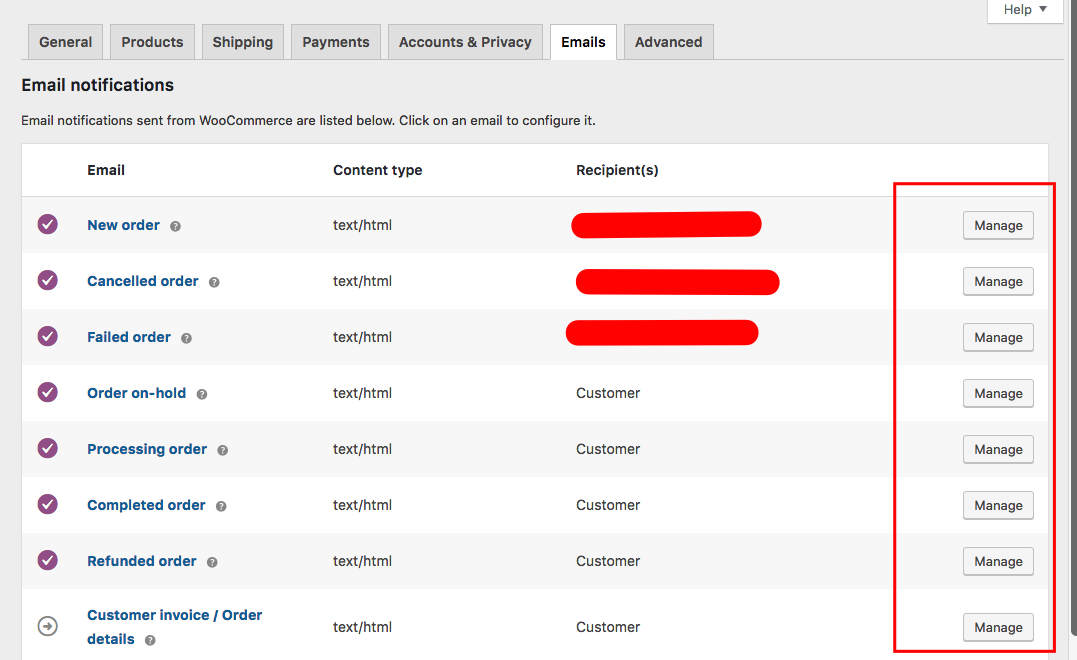
If you want to edit the email template, click “manage” button and you can edit each of the corresponding email template.
Hope this helps.
Ah! ok… thank you…
Glad we were able to help 
This topic was automatically closed 10 days after the last reply. New replies are no longer allowed.