Email form fields how to aligned and title unbold

Hi, I have searched the forums and can’t seem to make this work with what I have found.

I have used email forms to add a subscribe area in my footer. I would like all fields including subscribe button all on the one line rather than stacked.

I have also added text in the heading however I would like to centre this and unbold the text. Is this possible?

Hello Bridee,

Thanks for writing in!

To resolve your issue, please add the following CSS code in the X > Theme Options > Global CSS (http://prntscr.com/evui3r)

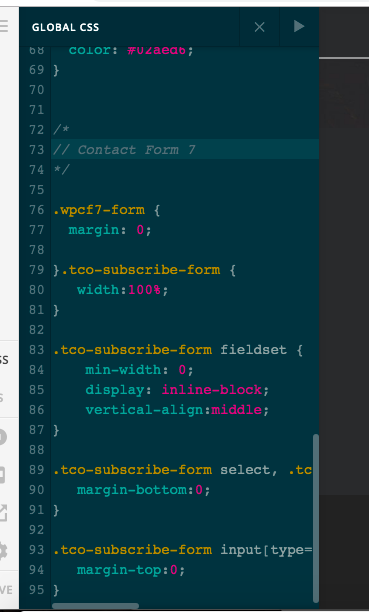
.tco-subscribe-form {
   width:100%;
}

.tco-subscribe-form fieldset {
    min-width: 0;  
    display: inline-block;
    vertical-align:middle;
}

.tco-subscribe-form select, .tco-subscribe-form input[type="text"], .tco-subscribe-form input[type="email"] {
   margin-bottom:0;
}

.tco-subscribe-form input[type="submit"] {
   margin-top:0;
}

And for your reference, please check out these threads:

Best Regards.

Hi, I have tried that code but nothing seems to happen. The other posts I found I tried to use their instructions also with no luck. I have included an image of where and I have put the code for your reference.

Hello Bridee,

I have checked your site and the Email Form fields were already aligned.

Please clear all your plugin caches (if you installed a caching plugin), clear your browser cache or use private browsing mode and test your site again.

Great thank you I can see that has occurred now. The text however is still bold?

Hi Bridee,

Please also add teh CSS code below:

.tco-subscribe-form-656 h1 {
    font-weight: normal;
}

The code above will make sure that the text above the form is not bold.

Kindly make sure that you clear cache to check the changes.

Thank you.

This topic was automatically closed 10 days after the last reply. New replies are no longer allowed.