Eliminating space between images in a single standard post

Hello

How can I apply CSS to a single post (not all posts) to make it so that there is no space between the images stacked on top of each other?

Please see the page below as an example

Thanks!

http://bedstuyloveaffair.us/wordpressdemo/2017/09/09/t-r-u-e-unit/

Hello @whitelobster11,

Thanks for asking. :slight_smile:

If you want to remove spacing between content images from all posts, please add following CSS:

.entry-content.content img {margin-bottom: 0;}

If you want to specifically target the post, here is CSS for the same:

.postid-632 .entry-content.content img {margin-bottom: 0;}

Thanks.

Thank you for this

Rather than specifying the post ID is there a way to create a class and then apply that class only to the posts where I want 0 margin on the images?

Thanks!

Hi There,

Yes, that is possible. Add the class on Post Settings > Body Classes
Then use this custom CSS:

.rest-post-img-margin .entry-content.content img {margin-bottom: 0;}

Hope this helps.

Hello

That did not seem to work- do I first need to create a class in the global css OR should I just be able to paste that directly into the post? I applied it here http://bedstuyloveaffair.us/wordpressdemo/2017/09/07/queens-way/

But the images still have space between them. Please let me know the steps I need to go through in order to eliminate the space between images

Thanks so much!

Hi again,

Please add the following code in your Customizer to remove the spacing between images:

.aligncenter {
    margin: 0 auto !important;
}

Hope this helps!

Hello

I am confused

When you say on my customizer, do you mean custom global css, or in the body tag for the individual post? I want to eliminate space between images but ONLY on certain specified posts. What is the best way to implement this?

Hey there,

If you need it on specific posts, then follow @Lely’s suggestion. Open your post in WP post editor, under Post Settings, find Body CSS Class(es) and enter a custom class for example no-margin and then go to Appearance > Customize > Custom > Edit Global CSS: and paste the following code:

.no-margin img {
   margin-bottom: 0 !important;
}
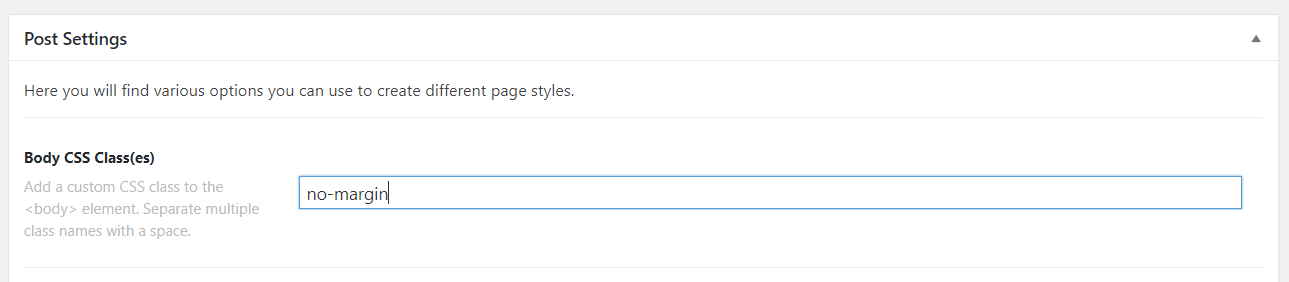
This will be applied to that post only. And you can reuse this code for any of your posts by just adding no-margin class to the posts’s Body CSS Class(es) field.

Hope this helps!