Out of the blue, not sure if it was after an update or something, I’m getting the error “This element failed to render. Additional error information may be found in your browsers development tools.” Ths appears on the backend in the content editor.

As far as I can tell, everything looks fine on the front end. Everything is up to date (WP, Pro theme, plugins) , I’ve tried disabling all my plugins, switching from the child theme to the parent theme… Nothing fixes it. Another weird issue that occurred at the exact same time, so I think it has to be related, is that my dropdown menus are aligned incorrectly. See the following images:

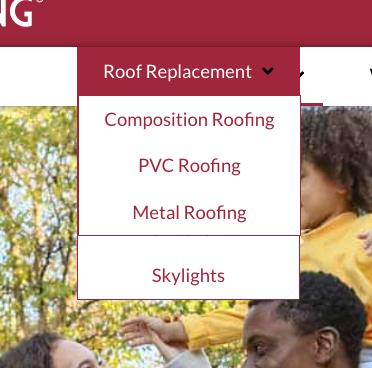
The dropdowns totally cover the content behind them. The isn’t what used to happen. The would drop below the menu so you could still read the menu text. I didn’t change any settings in the menu, this just started happening the exact same time the “element failed to render” issue started. Hoping someone can help out soon as I’m kind of dead in the water until this gets fixed.