Is it possible to edit the classic callout? I would like to make the boxes transparent if possible but cant seem to be able to edit them in Cornerstone
Hi there,
There is no option to make the boxes of the callout element transparent. But you can do it with custom CSS code. Kindly add the transparentcallout class to the callout element:
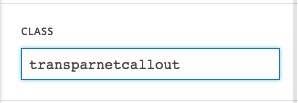
And add the code below to X > Launch > Options > CSS:
.x-callout.transparnetcallout,
.x-callout.transparnetcallout:before {
    background-color: transparent;
}
That will do it. If you need further assistance kindly get back to us with the exact page URL that you have the callout and the exact changes you want.
Thank you.
Thank you, I see how that works now. Ideally I would like the call out to look very similar but to have degree of transparency rather than being totally transparent, is that easy to do?
Actually my terminology may be wrong, on further research I think opacity may be what I’m looking for.
Hey Christian,
Don’t use opacity because that will reduce the opacity of the content also. Instead, replace transparent with RGBA
Thanks.
Thank you, do I do that in the same way as before? Apologies this is all new to me.
Yes, like this:
.x-callout.transparnetcallout,
.x-callout.transparnetcallout:before {
    background-color: rgba(0,0,0,0.5);
}
Hi There Christian, thats it yes thank you.
Glad that er could be of a help 
This topic was automatically closed 10 days after the last reply. New replies are no longer allowed.