How can edit Buddypress NavBar. I want to add more features there. Please View image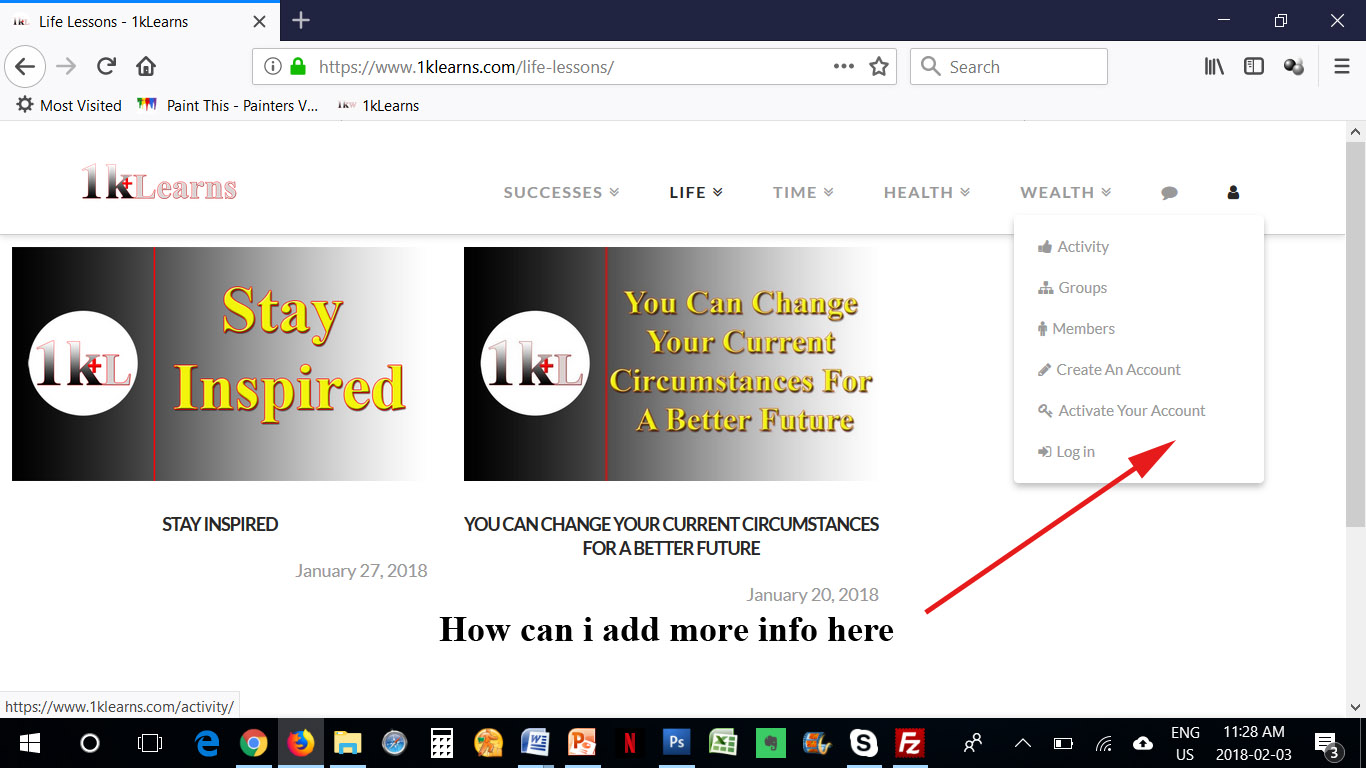
Hey There,
Thanks for writing in!
The buddyPress menu items were integrated in the theme. If you want to override and add your own, please add the following code in your child theme’s functions.php file
function x_bbpress_navbar_menu( $items, $args ) {
if ( X_BBPRESS_IS_ACTIVE && x_get_option( 'x_bbpress_header_menu_enable' ) == '1' ) {
$submenu_items = '';
$submenu_items .= '<li class="menu-item menu-item-bbpress-navigation"><a href="' . bbp_get_search_url() . '" class="cf"><i class="x-icon-search" data-x-icon="" aria-hidden="true"></i> <span>' . __( 'Forums Search', '__x__' ) . '</span></a></li>';
if ( is_user_logged_in() ) {
$submenu_items .= '<li class="menu-item menu-item-bbpress-navigation"><a href="' . bbp_get_favorites_permalink( get_current_user_id() ) . '" class="cf"><i class="x-icon-star" data-x-icon="" aria-hidden="true"></i> <span>' . __( 'Favorites', '__x__' ) . '</span></a></li>';
$submenu_items .= '<li class="menu-item menu-item-bbpress-navigation"><a href="' . bbp_get_subscriptions_permalink( get_current_user_id() ) . '" class="cf"><i class="x-icon-bookmark" data-x-icon="" aria-hidden="true"></i> <span>' . __( 'Subscriptions', '__x__' ) . '</span></a></li>';
}
if ( ! X_BUDDYPRESS_IS_ACTIVE || X_BUDDYPRESS_IS_ACTIVE && x_get_option( 'x_buddypress_header_menu_enable' ) == '' ) {
if ( ! is_user_logged_in() ) {
$submenu_items .= '<li class="menu-item menu-item-bbpress-navigation"><a href="' . wp_login_url() . '" class="cf"><i class="x-icon-sign-in" data-x-icon="" aria-hidden="true"></i> <span>' . __( 'Log in', '__x__' ) . '</span></a></li>';
} else {
$submenu_items .= '<li class="menu-item menu-item-bbpress-navigation"><a href="' . bbp_get_user_profile_url( get_current_user_id() ) . '" class="cf"><i class="x-icon-cog" data-x-icon="" aria-hidden="true"></i> <span>' . __( 'Profile', '__x__' ) . '</span></a></li>';
}
}
if ( $args->theme_location == 'primary' ) {
$items .= '<li class="menu-item current-menu-parent menu-item-has-children x-menu-item x-menu-item-bbpress">'
. '<a href="' . get_post_type_archive_link( bbp_get_forum_post_type() ) . '" class="x-btn-navbar-bbpress">'
. '<span><i class="x-icon-comment" data-x-icon="" aria-hidden="true"></i><span class="x-hidden-desktop"> ' . __( 'Forums', '__x__' ) . '</span></span>'
. '</a>'
. '<ul class="sub-menu">'
. $submenu_items
. '</ul>'
. '</li>';
}
}
return $items;
}
add_filter( 'wp_nav_menu_items', 'x_bbpress_navbar_menu', 9996, 2 );
Please do not forget to add your customizations or else it will just display the same.
I have added the code. But i am very new to all of this. Where do i add customization to edit it. Let’s say i want to remove or add something to it
Hello There,
What you have wanted require knowledge on coding. If you are not sure of what you are doing it is best that you contact someone to do this customizations for you. We cannot do it for you because custom development is beyond the scope of our support. We can only give you some guidance on where and how you can get started. Please keep in mind that our support only covers getting your theme set up, bug fixes and minor cosmetic changes.
If you want to delete an item in the bbPress Menu, what would it be so that we can modify the code and remove it for you.
Thanks.
Ok i understand. I would like to remove Activate your account. Thanks
Hi,
You can remove it by disabling Anyone can register under Settings > General

Thanks
This topic was automatically closed 10 days after the last reply. New replies are no longer allowed.