E&P Formbuilder and Cornerstone cannot save different forms on different language

Hi there,

For my website simplify-everything.com I am using E&P Cost Estimation Form builder (comes with X). As it is not translatable, I have 3 forms installed for 3 languages. But all of a sudden, it only wants to load the english version for all other languages. Cornerstone doesn’t save the right value’s to the page database.

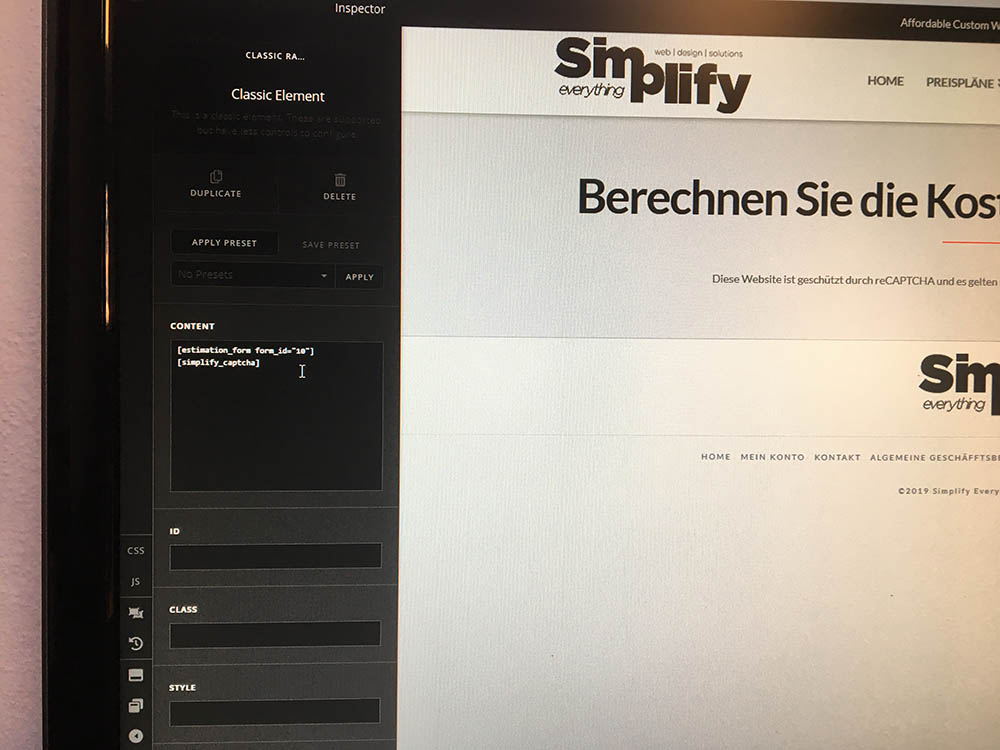
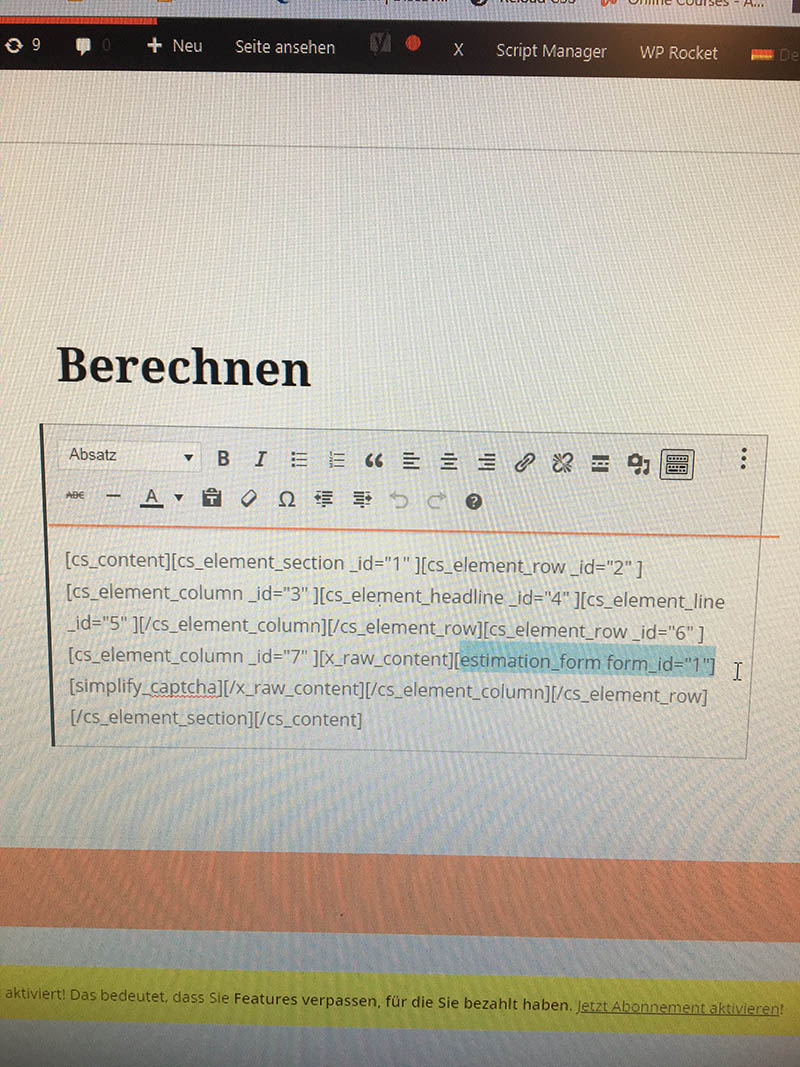
I have added 2 images to illustrate the problem. 1 image shows the shortcode in cornerstone, where form_id=“10”. The second image shows the same page, but in the Classic Wordpress editor and you see form_id=“1” wich is the english form.

It has all been working fine before, but ever since the last round of plugin updates this issue seems to be here. On other pages, cornerstone works fine, but only around this shortcode it seems to mess up.

I have tried disabling all other plug-ins, but with no result. I am using WPML for the languages btw. I have also made a page from scratch, starting in german. But then my english translation shows the german form as well. So same issue.

Do you have any idea what this can be? This is the URL to the problem: https://simplify-everything.com/de/berechnen/

Please let me know what I can do

Best regards,
Raymond
Hey Raymond,

We’ve received similar reports that WPML is loading the wrong language. We’re currently investigating. For now please try downgrading WPML and WPML Addons to the following:

  • WPML Multilingual CMS - 4.0.6
  • WPML String Translation - 2.8.6
  • WPML Translation Management - 2.6.7

Thanks.

Hi Raymond,

As an addition to @christian_y recommendation, please try these versions too

WPML Multilingual CMS - 4.2.6
WPML String Translation - 2.10.4
WPML Translation Management - 2.8.5

I have done some testing and all these issues happened after the WPML updates especially the 4.2.7. Though I’m not ruling that out yet as I have different findings from each report, some have redirections. Would it be okay if you provide the working credentials again? I like to check it again perhaps those multiple reports are not related at all and isolated to user configuration.

Thanks!

Hi Rad,

Thanks for the message. Unfortunately I am not able to downgrade WPML as my website will then turn into many errors due to other plug-in conflicts. So I am afraid we need to wait till the next update? Or?

Thanks for letting me know

BR
Raymond

Hi Raymond,

Thank you for your message. The problem is that we have inconsistent reports, it will really help us if we can have as many cases as possible to test. This will be a huge help to us if you might possibly can give us a staging version of your website maybe?

This way we can delve into details and find out the problem cause to report to our development team and WPML team.

Thank you.

Hi,

Ofcourse you can. Sorry, I was away for a few days :slight_smile:

Here is the details to our staging area:

Let me know if you need anything else.

I would be happy when you can find a solution to this issue

Best regards,
Raymond

Hi @maxpage91,

Thank you for taking the time and provide this environment to work upon. I shared this information in our issue tracker where our dev guys work on. Just to let you know this seems to be indeed something related to the latest version of the WPML plugin and conflict with the Yoast plugin at the same time!

Unfortunately the login information did not work for me. So I wonder if you could double-check that the information is correct?

Thank you.

Hi,

I had the Captcha still on, and the domain wasn’t registered there yet. Normally we use Trusona to log in so I didn’t realize :slight_smile: . Also. you first need to accept the cookies in order for the captcha to work. You can do that by going to the page: http://simplify.staging-simplifyeverything.kinsta.cloud/en/

Login works now, just tested it

Best regards

Hey @maxpage91,

It’s weird that I’m getting a different result or unlike your test. Please see the secure note of the test page apex-test with translation pages I’ve created. The only problem in my test is, the Estimation Form won’t show up in the front-end of the NL and DE languages. They work fine in Cornerstone.

This is may because:

  1. I’m using V2 Text element
  2. Because I’m using a V2 element, the shortcode of the E&P isn’t directly posted in the Content Area of WordPress so potentially causes confusion to the E&P system.

I created another test page apex-test-classic-element with translations but this time, I inserted the E&P shortcode in a Classic Text element and there’s no problem (see secure note).

By the way, I have deactivated all the third-party plugins except WPML because some of the plugins have Javascript errors and this is to know if the issue is coming from Cornerstone, WPML and E&P only.

Please try testing now to see if we get the same result. Just note that you should not use WPML’s Translation Editor. You must create a new page and translate directly using the Translation Flags in Cornerstone.

Thanks.

Hi

I have tested it and I see the same results at first. So I decided to try this on the live site straight away

Funny enough, when I changed the element on the live site to classic text, i have the dutch version showing up in dutch, english for english, but the german switched to dutch as well. I am totally confused now, why would it work on 2 out of 3 languages? And only this shortcode seems to be the problem. I have changed it in the database manually now, because it had to be solved.

When looking at the staging, this seems to working just fine on the pages you have created as well as the once I created. So it must be a plug-in conflict then. Any ideas where?
Another possibility might be any form of cache. As the staging doesn’t have cache at all. Also no CDN is active here

I have solved the problem on the live site by going into the database, but would be cool to see wich plugin has a conflict.

Best regards,
Raymond

Hey Raymond,

We have a known conflict with the latest WPML and Yoast SEO versions. But, I activated all the plugins in the staging site and created a new test page but nothing’s duplicated the same as my previous test (see secure note).

Maybe caching and CDN might have an effect on this. Would you mind temporarily deactivating them in your live site?

If that doesn’t help, please also give us the URL of the page with issue in your live site and WordPress access to your live site also.

Thanks.

This topic was automatically closed 10 days after the last reply. New replies are no longer allowed.