Display post data in Global block

Good day Support,

I’ve set up a custom single post php template(s) in the child theme with shortcodes to custom ‘global blocks’ inserted above and below the post content as per this support post:

I need to dynamically populate these global blocks with post data/meta such as:

Post title
Feature image
Post category
Post tags
Post author
Publish date

Is it possible to do so and how would I go about it?

Best regards

Hi @Glasseye,

We need more information about your end goal. When you say post, are trying to display a single post or a group of post? Depending on your answer, the approach is different.

When you add text, or header element, you can see an option to add dynamic content. It is the icon on the lower right part. It will give you options on what dynamic content is available:
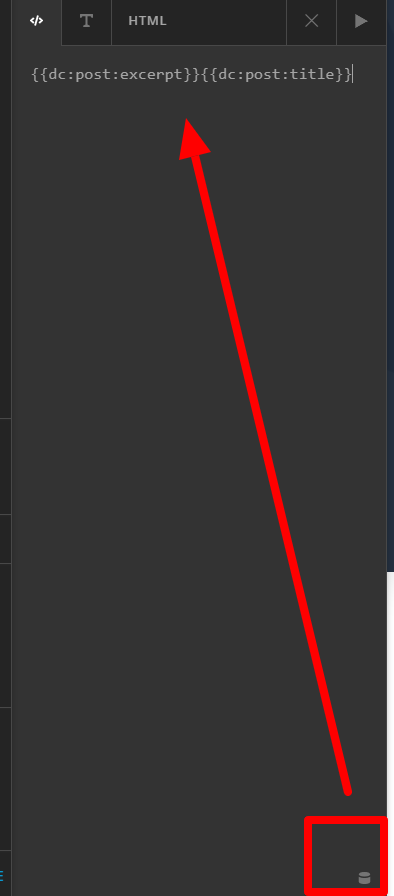
The issue with that is, it will only retrieve current post/page information. With what you are trying to achieve, I guest you want to display a different post, maybe a related post series? If that is what you want, may suggestion is to build it using ESSENTIAL GRID instead. It is a bundled plugin with skin editor. You can build the design you want it in. Then on your single post template, instead of adding a global blocks, please add the essential grid shortcode instead. Essential grid is very flexible, you can use categories to manipulate display.

Hope this helps.
Hi @Lely,

This is great, exactly what I needed, I never even noticed the tiny icon at the bottom right!

I’m setting up a custom template for single posts using Global Blocks to create custom headers and footers. I needed to add this type of dynamic content to display the relevant post data on each post page.

Thanks so much for your help, my problem is solved!

All the best!

You’re welcome!
We’re glad @Lely were able to help you out.

This topic was automatically closed 10 days after the last reply. New replies are no longer allowed.