I would like to know if it is possible to have a hidden row that is only displayed when a user presses a button or link. And how would I achieve that?
Hi There,
It’s possible with the custom JS. Please add the following code under X > Theme Options > JS:
jQuery("document").ready(function($){
	$('a#show_section').on('click touchend', function(event) {
		event.preventDefault();
		$("#hidden_section").slideToggle();
	});
});
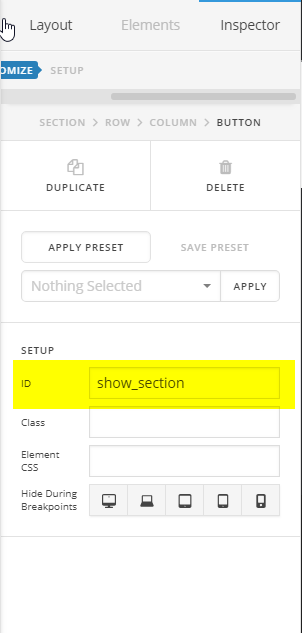
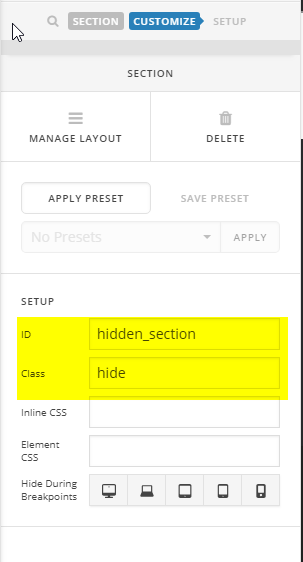
After that create a button with the show_section ID. Then create a section with the hidden_section ID and hide class.
Let us know how it goes!
Thanks for your quick response. So is it not possible to do that with a row, give the row or column a ID. I already have the section visible but just want to display more info in that section if the user wants to display it.
Bit like a Read More button, but that only displays text and I need it to display a lot more info in multiple rows.
Hello There,
Instead of adding the custom hidden_section in the section, you can add it in the row settings. To avoid confusion, you can add an ID “hidden_row” (do not forget the hide class) in your row settings and then in the JS code you must change it as well into:
jQuery("document").ready(function($){
	$('a#show_section').on('click touchend', function(event) {
		event.preventDefault();
		$("#hidden_row").slideToggle();
	});
});
And to trigger this with just a link, you can use an html code like this:
<a id="show_section" href="#">Read More</a>
Hope this helps.
tried this out and works but the hidden row once opened stays open for the next visitor to the site. I need the default position of the row to be hidden to any new visitor. Any suggestions?
Hey @waynepatt58,
You will need additional custom coding to achieve that and that will be getting into custom development which is outside the scope of our support.
I’d recommend you use an Accordion element to hide or display additional information.
Thank you for understanding.
This topic was automatically closed 10 days after the last reply. New replies are no longer allowed.