Display full title in blog slider (Ethos)

Hi! I’d like to display the full title of my blog posts in the post carousel slider (Ethos theme). Right now, it’s adding an ellipsis to the end (screenshot attached).

Edit: I figured out how to display the full title, but I’d like the spacing between the top and bottom line of the table to be vertically centered in the black transparent box at the bottom. In the screenshot below, the birthday cake one is perfect but I want the other one to be center-aligned vertically.
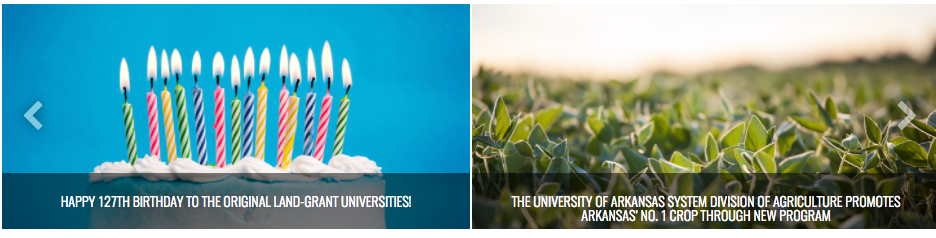
Another edit (sorry): It looks like it’s only displaying the full title in the slider on the individual posts pages (example: http://agisamerica.org/university-of-kentucky-has-advice-for-struggling-grain-producers/). I’d like it to display the full title on the News page too (http://agisamerica.org/news/), also vertically aligned in the black transparent box.

Thanks!

Hi There,

Please add the following code to Theme Options CSS, it will reduce the padding on top of the titles and there will be enough space even for your very long titles. They will be aligned on the top.

.h-entry-cover {
    
    padding: .5em !important;
}

Hope it helps

Thanks! That worked. Is it possible to center align the text vertically within the black transparent box? Maybe a flexbox code or something that would push one and two line titles down a little to the middle?

Hi there,

Please add this CSS as well,

.x-post-carousel-item .h-entry-cover {
   line-height: 40px;
}
.x-post-carousel-item .h-entry-cover span {
    line-height: normal;
}

Hope this helps.

Thanks. The titles that go onto three lines are overflowing though.

How can I vertically center the title based on the height of the span and adjusting for three? Even if the line height is reverted to default single.

Thanks!

Hello There,

I have checked your site and it seems that the issue has been resolved. This is what I am seeing:

If you need anything else we can help you with, don’t hesitate to open another thread.

Hi! The three line title look good, but for the single and double line titles, how can I vertically center align those within the black transparent box so that there’s equal padding on the top and bottom? The first, third and fourth boxes in your screenshot above are a good example.

Thanks!

Hi There,

Try this CSS instead:

.h-entry-cover {
    padding: .5em !important;
    display: flex;
    justify-content: center;
    display: flex;
    justify-content: center;
    align-items: center;
    position: absolute;
    width: 100%;
    height: 100%;
    max-height: 58px;
}

Max-height property is important. See this: https://screencast-o-matic.com/watch/cb6wIg2eVG

Hope this helps.

1 Like

Works great – thanks! I’m getting different line weights in Chrome and Safari, though. It’s bolder in Chrome and looks okay, but in Safari it’s too hard to read. Is there a fix for this? Screenshots below.

Thanks in advance!

Hi there,

Please add this CSS to your global custom CSS.

@media not all and (min-resolution:.001dpcm) { @media {
    body {
    -webkit-font-smoothing: subpixel-antialiased;
    }
} }

Hope this helps.

This topic was automatically closed 10 days after the last reply. New replies are no longer allowed.