Designing a menu item

Hello Team, Happy Saturday. I really need your help to understand how to design / modify one menu item in my menu. Basically I would like for one menu item to have a different background color, different font size and so on,

please would you assit to do so ?

Hi @ismaine

Thank you for reaching out to us. You can do this by assigning a class to your menu item by navigating to Appearance > Menus then expand your menu item and in the CSS Classes (optional) field enter standout-menu-item (see screenshot)
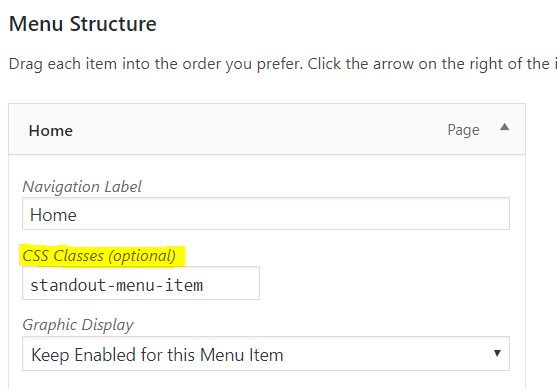
If you don’t see the CSS Classes (optional) field you’ll need to first enable it by clicking on Screen Options in the upper right corner of the screen (see screenshot)
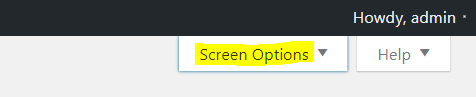
In Show advanced menu properties section enable CSS Classes option (see screenshot)

You can then add the following code in the Theme Options > CSS:

.standout-menu-item > a > span {
    border: 2px solid #559D07;
    padding: 20px;
    background: #c2ffb5;
    color: #559D07;
}

Here are some related links for further reading, this could help you in finding and implementing some CSS fixes:

Don’t forget to clear all caches including your browser’s cache after adding the code. Let us know how this goes!
1 Like

outstanding… thank you ! it works

Dear @Nabeel

i just realized. How do I make the new design for the menu item just showing up on the home page but looking normal on all the other pages ? thanks !

Hi @ismaine ,

To have it on homepage only, please replace the previous code with the following:

.home .standout-menu-item > a > span {
    border: 2px solid #559D07;
    padding: 20px;
    background: #c2ffb5;
    color: #559D07;
}

Please note that the code provided above serves as a guide only and is to help you in getting started so implementing it and maintaining the code will be out of our support scope and for further maintenance for new possible versions of the theme that may cause the customization to break, you will need to hire a developer.

Thanks!

thank you. works like a charm !

You are most welcome. :slight_smile:

This topic was automatically closed 10 days after the last reply. New replies are no longer allowed.