Data Tables & Taxonomies

Hi,

I currently have a CS Archive Layout, which uses the Search & Filter plugin to filter lists of records. I am in the process of trying to rebuild the page using Data Tables, which looks to be ideal for this task.

However, I am having difficulty getting the loopers right. Due to the way Search & Filter advised the CPT should be built, to maximise speed, names, places etc. are all ACF Taxomomies, rather than post fields. Looking at the screenshot below, each of those columns is an ACF taxonomy.

Remembering that this is an archive layout, how should I structure the looper(s), or is it not possible to do what I am looking for with the data in its current structure?

Any advice is welcome.

Many thanks,
Christopher
Hello Christopher,

Thanks for writing in!

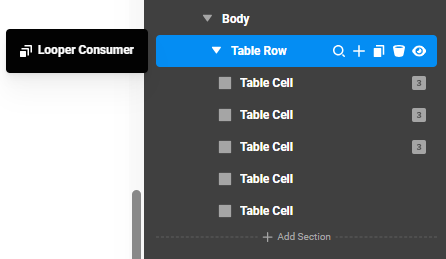
Your Looper structure is incorrect. It should be like this:
image

The Body Table Row should be a Looper Consumer that consumes the current Baptism items since this is an archive layout.

Each of the Body Cells is a nested Looper Provider Current Post Terms/Looper Consumer, and to display the term, you will use"{{ term.name }}" Twig code.

You may need to display the List Looper Consumer first.

Check your layout now.

By the way, have you checked out our Data Tables tutorial? View it here: https://www.youtube.com/watch?v=Exxq_JylWJc

Thanks @ruenel,

I did view Josh’s tutorial - standard ACF setup, unlike mine, which is where I got confused!

Late here, but I will have a look over the weekend, as I cannot see any changes (if you made any?). I had tried your approach, but did not get the results I hoped for - will they show in the CS preview, or only on the frontend?

Many thanks as ever,
Christopher

Hey Christopher,

It is partially displaying in the builder preview. I only modified the first two terms.

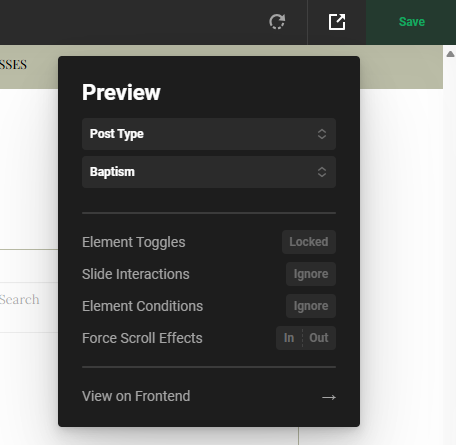
Just make sure to assign the archive in the Preview URL:
image

Cheers.

Thanks @Ruenel. That all makes sense and I have completed the rest of the columns.

Two more questions:

I know that there are 1,419 entries in this specific CPT. However, the data table only shows 50. The looper consumers are set to All, but the maximum number of posts available is always 50. Can this be overriden anywhere to show all entries?

The second question is, I can find no way to turn any of the cells to hyperlinks. The aim is to click on the surname and click through to the full post. Is there a way to do this.

Thanks for all your help,
Christopher

Hello Christopher,

For the surname hyperlink cell, I suggest adding a Headline element, enabling the link option, and entering the URL in the URL field.

Regarding the number of posts, it may be caused by a plugin conflict. I recommend clearing your website and browser cache, temporarily deactivating all third-party plugins, and then checking the issue again.

Thanks

Hi,

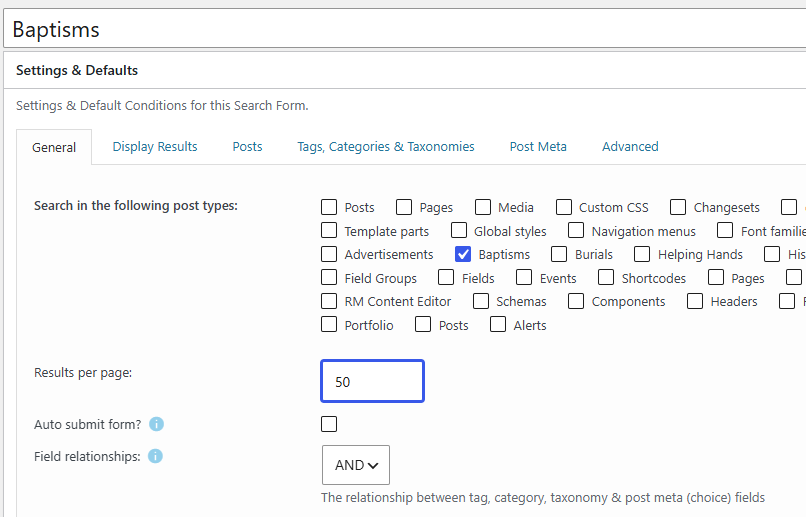
The 50 post limit was caused by Search & Filter. When deactivated, the limit went down to 12 - Settings > Reading - page limits. When I changed from 12 to 1500, the full 1,419 posts displayed. However, that causes chaos in our blog posts! Is there a way to manage this so the data table output number can be managed when using an archive layout?

The headline suggestion (which I had previously tried) worked - but only after the cell content was deleted - I have asked Charlie for a documentation addition on this.

Thanks,
Christopher

Hey Christopher,

The plugin Search and Filter sets the limit for the Baptism archive layout.

Set it to -1 instead.

Best Regards.

Thanks @ruenel. I get what you are saying (and know of the S&F setting), but I had temporarily disabled that, before reenabling it due to current live functionality. With S&F disabled, the default Settings > Reading limits came into play (12 posts in my case).

It looks like the Archive Layout is the issue, so I have tested on a standard Page using the query builder looper provider. Suddenly, all works fine, as the Count can be controlled by the Provider. I was trying to use the same infrastructure as the S&F setup. That was my fundamental error.

@DoncoMarketing - a tutorial on using Ajax in Data Tables would be a huge help, as the documentation is minimal at this point in time, so close to the plugin’s release!! :grin:Ajax would be ideal in this scenario.

Many thanks,
Christopher

Hello Christopher,

I’m glad you were able to identify the cause and get it working with the Query Builder Looper Provider. I also appreciate the feedback regarding the Data Tables documentation. A tutorial covering how to use AJAX with Data Tables would certainly be helpful, and we’ll pass that feedback along to the team.

Thanks

This topic was automatically closed 10 days after the last reply. New replies are no longer allowed.