Customizing the Post Template

So I might have overlooked this for a couple years now, but I cannot figure out how to customize the template for posts similarly to how I would pages. Cornerstone works so freakin great with pages, but the post templates that come with X out of the box are rigid and inflexible without a good bit of custom CSS.

Basically, I want to be able to create a post template for portfolio work that is a blank slate, just like a page, with everything under the header and above the footer being editable via Cornerstone. If this is not possible, I’d like to submit it as a feature request, because I cannot use the post feature as it currently operates.

I am open to suggestions. I basically need the whole page to be able to be full width, because I would like some content full width and others contained. Much like my home page (http://formula.design/). I am not a web developer, so writing php is going to be a no-go, unless it is an easy copy/paste situation.

Thanks in advance for your input!
Hello There,

Thanks for writing in! The post templates is currently available for posts only. It is not available in the portfolio items in the theme. We’ve added this as a feature request so it can be taken into consideration for future development.

By the way, you might be interested in checking out this thread: https://theme.co/apex/forum/t/creating-post-templates-without-a-landmark/31069, https://theme.co/apex/forum/t/post-template-for-custom-post-type/7495 as a reference if you want to customize your very own clean slate post template.

Hope this helps.

Not exactly what I was asking about. I just want my posts to be as attractive as my pages. I found the portfolio item template to be just as rigid and inflexible as the post template. I just want to be able to style my posts similarly to my pages. X theme boasts unlimited customization of nearly everything, but I find it difficult to make my posts look good within the constraints set forth by the theme, that is without a good deal of custom CSS or changing the theme files. As I said, I am no code developer. Cornerstone doesn’t even appear to be available for posts.

Until ya’ll manage to add some of these as features, is there a simple copy/paste workaround I can employ to make my posts a little more customizable? Otherwise, I am going to have to keep using pages for new portfolio work so that I can make them look the way I need them to.

Hi There @Formula_Design

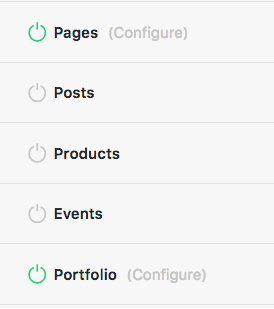
It’s possible to use Cornerstone to create your post layouts and portfolio items. But to do that, you will need to set permissions by head over to X -> Settings -> Permissions area.

Then you should be able user Cornerstone to create your layouts.

Hope that helps.

1 Like

This topic was automatically closed 10 days after the last reply. New replies are no longer allowed.