Customizer questions

Three issues:

  1. In www.leannacinquanta.com I just made a blog post and after inserting a text box, then when I drag a new element to go below it such as a custom headline or image, the new element zooms up to the top and refuses to be positioned below the text area!! How can this be fixed? This is forcing me to create a new row for EVERY new element I want to add…

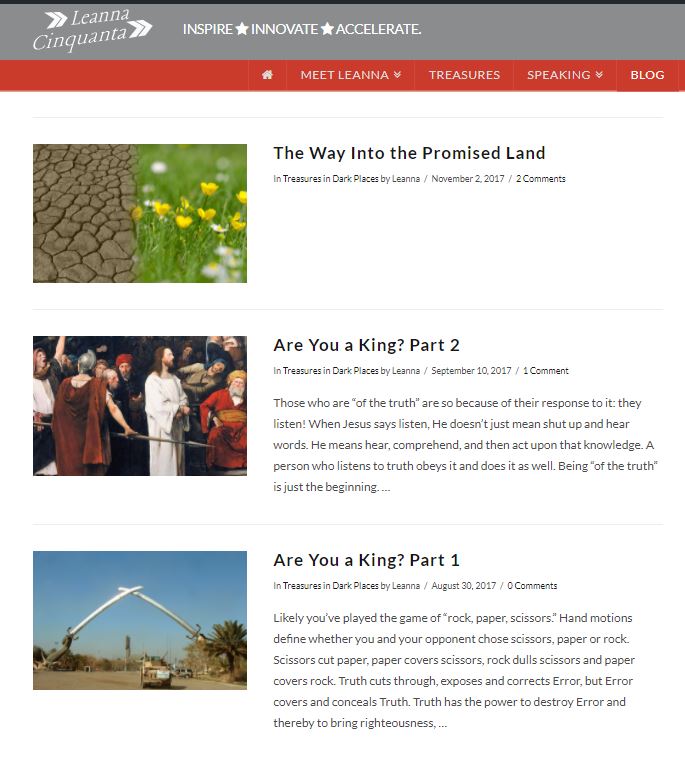
  2. Also when I use the new text area that allows posting of rich text, the preview text doesn’t come up in my blog post. See attached - the bottom two posts were with the old text area, the top one is the new one. No text preview! How can I fix this?
  3. In the new Customizer “custom headline” element there’s no option to adjust padding, styling etc. Where can i find that?
    thanks
Hello There,

Thanks for writing in!

1.) I have edited one of your draft page and I could not replicate the issue. This is the result of my test:

Could you please provide a screenshot of what you are experiencing?

2.) The text element will still be wrapped in a Cornerstone formatting shortcode. And please understand that WordPress excerpts does not display anything text that is wrapped by a shortcode. WordPress excerpts can not display any excerpt of the page creayed in Cornerstone. You will have to make use of the Manual Excerpts so that there is something to display in the blog index.

3.) You can adjust the margin and padding down in the bottom. Click the Design tab in the top most area of the headline element setting.

Hope this helps.

This topic was automatically closed 10 days after the last reply. New replies are no longer allowed.