Customise Drop down menu

Hi all,

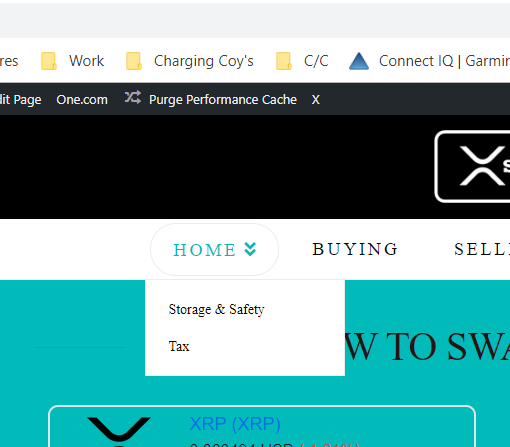
I’m having issues finding the options to edit/customise the drop down menu from my header (image attatched). Can some please tell me where to locate the options please? I want to change the size and colour of the text, once found I’ll be ok to edit it!

Many thanks

Michael
Hi Michael,

Thanks for writing in!

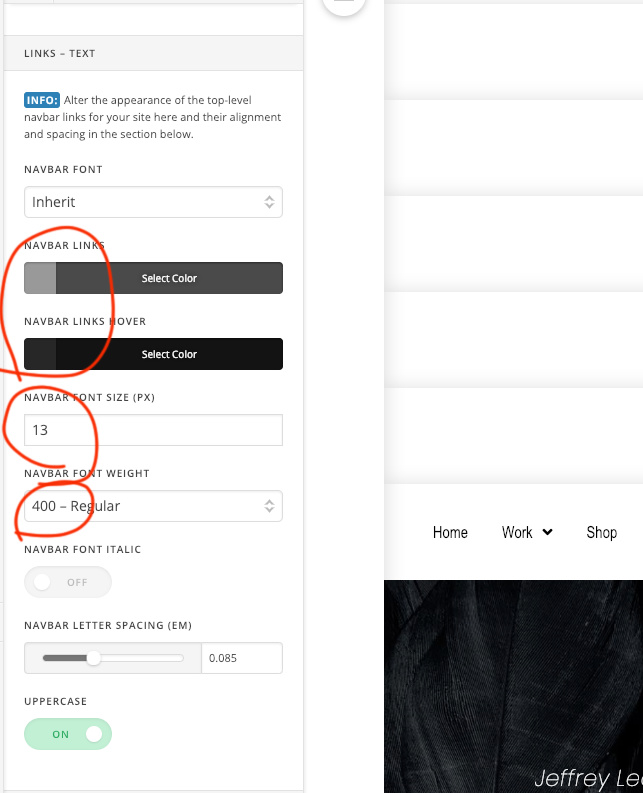
The header menu setting can be found in X-> Theme Option -> Header
In the Link -Text section you will find all the options to check the text.

Hope this is something you are looking for.

1 Like

Hi Basanta,

I’m editing the settings as you displayed however the only text that is changing is the main header text, the drop down menu of the home button are staying the same size?

Michael

Hello Michael,

Sorry if it did not work for you. The submenu styling is inherited from the parent menu item. If you want to customize it, please add the following CSS code in the X > Theme Options > Global CSS (http://prntscr.com/evui3r)

.desktop .sub-menu a span {
    font-size: 16px;
    color: red;
}

.desktop .sub-menu a:hover span {
    color: green;
}

Please let us know how it goes.

1 Like

Hi RueNel,

That bit of CSS code worked perfectly, thank you very much!!

Till the next time, all the best

Michael

You’re most welcome Michael!

This topic was automatically closed 10 days after the last reply. New replies are no longer allowed.