I read that the customizer does not support script tags.
Can I paste this as is into the customizer?
If not, can you please update accordingly
I read that the customizer does not support script tags.
Can I paste this as is into the customizer?
If not, can you please update accordingly
Hi There,
Please add this code under functions.php file locates in your child theme:
add_action( 'x_before_site_begin', 'print_script_before_site_begin' );
function print_script_before_site_begin(){
	?>
	<!-- Google Tag Manager (noscript) -->
	<noscript><iframe src="//www.googletagmanager.com/ns.html?id=GTM-K6FT6LN"
height="0" width="0" style="display:none;visibility:hidden"></noscript>
	<!-- End Google Tag Manager (noscript) -->
	<?php
}
I’m sorry. The script code did not paste correctly. Can I paste this as is into the customized javascript section or should we put this in the functions.php? Thanks!
Here’s a pic.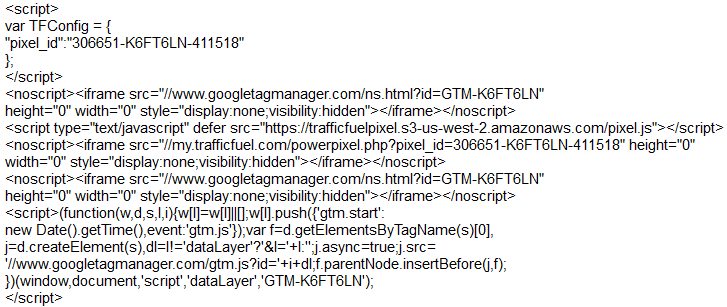
Hello There,
Thanks for updating in! If you will add your custom JS code in the customizer’s global custom JS section is possible just make sure that you remove the beginning <script> tag and the closing </script> tag in the code above because the customizer’s output is already wrap with the tag.
Hope this helps. Please let us know how it goes.
Thank you for the help. We appreciate it!
You’re welcome.