Custom Image Sizes Capped at 742px Width?

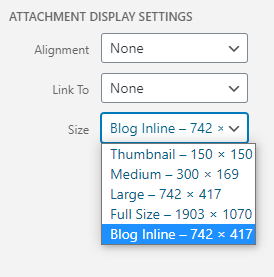
No matter how I try to add a custom image size to the library, it seems to be generated with a max width of 742px. Here’s what I’m trying now hoping to see a new “Blog Inline” version selectable in the media library with an 800px width. Unfortunately, no matter how I add the custom image size, it’s always capped at 742px wide.

//Add Blog Inline Image Size
function pw_add_image_sizes() {
add_image_size( ‘blog-inline’, 800, 9999, false );
}
add_action( ‘init’, ‘pw_add_image_sizes’ );

function pw_show_image_sizes($sizes) {
$sizes[‘blog-inline’] = __( ‘Blog Inline’, ‘pippin’ );

return $sizes;

}
add_filter(‘image_size_names_choose’, ‘pw_show_image_sizes’);
image

Hi @Speshled,

Thanks for reaching out.
It seems that it shows the Size as text from the Large one. Can you please check once by adding the blog-inline size into any of the WordPress functions whether it creates the image in that size.

Please remember to check with any image that is bigger in the size you specified in the size. If that does not work and it cropped to the Large size only, I would suggest you consult with any developer for this. And if you are using any 3rd Party plugin, in that case, contact with the plugin author with your issue.

Please remember that we don’t offer any support or investigation on the custom code or issue related to that.

Thanks

This topic was automatically closed 10 days after the last reply. New replies are no longer allowed.