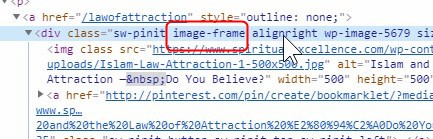
Hello, I had submitted a previous thread but am unable to respond so have had to begin another. As per the instructions from support staff, I have added the following custom css code via Theme Options >> CSS so as to have images with the class “image-frame” display with a simple border surrounding them.
.image-frame {
border: 1px solid rgba(0,0,0,0.075);
padding: 5px;
}
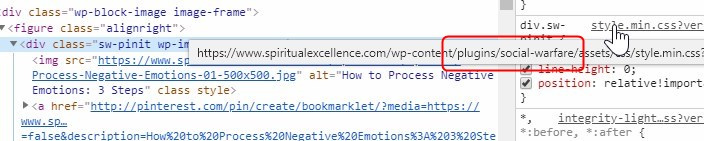
For some reason, this is not displaying properly when adding the class in the “Advanced >> Additional CSS Class” field with the new Gutenberg editor in WordPress. It works normally however when using the Classic Editor, or the Themeco Pro Editor on pages.
Also as per your suggestions, I tried disabling all plugins but still did not get the desired output. Do you guys have any idea what could be wrong?
An example of the frame appearing improperly (appears just above the image rather than surrounding the image) can be seen at https://www.spiritualexcellence.com/blog/how-to-process-negative-emotions-3-steps/ just below the title of the article.
An example of the frame appearing properly can be seen at https://www.spiritualexcellence.com/blog/islam-and-the-law-attraction/ on the square images within the article (yet this article was created with the original Classic Editor).
Any suggestions or modification to the code that may be necessary? Thank you much.