Current location menu state

Hi support team. I have a pro site with two bars that have two different menu. The first menu has icon animation with colour change and a type and background colour change.

The second menu has a background and a type colour change and a line animation.

I would like to display the current page state. I try this code that your staff give to me to resolve this problem for another site. In the global CSS.

.x-menu > li.current-menu-item > .x-anchor .x-anchor-graphic [data-x-icon],
.x-menu > li.current-menu-parent > .x-anchor .x-anchor-graphic [data-x-icon] {
    colour: rgb(46, 182, 115);
}

.x-menu > li.current-menu-item > .x-anchor span.x-anchor-content,
.x-menu > li.current-menu-parent > .x-anchor span.x-anchor-content {
    background-colour: rgb(34,85,126);

But the two menu display the same colour.

My site is here http://lekamouraska.com/accueil/
Hi There,

Please update the custom CSS to this:

.hm14.x-menu > li.current-menu-item > .x-anchor .x-anchor-text-primary,
.x-menu > li.current-menu-item > .x-anchor .x-anchor-graphic [data-x-icon],
.x-menu > li.current-menu-parent > .x-anchor .x-anchor-graphic [data-x-icon] {
    color: rgb(46, 182, 115);
}

.x-menu > li.current-menu-item > .x-anchor span.x-anchor-content,
.x-menu > li.current-menu-parent > .x-anchor span.x-anchor-content {
    background-colour: rgb(34,85,126);
}

Hi Thai. That is not what I want.

Each bar have a different hover state and I would like to display that state for the current page state.

Hello There,

Thanks for updating in! There was a typographic error on the code. It should only be background-color:.

.hm14.x-menu > li.current-menu-item > .x-anchor .x-anchor-text-primary,
.x-menu > li.current-menu-item > .x-anchor .x-anchor-graphic [data-x-icon],
.x-menu > li.current-menu-parent > .x-anchor .x-anchor-graphic [data-x-icon] {
    color: rgb(46, 182, 115);
}

.x-menu > li.current-menu-item > .x-anchor span.x-anchor-content,
.x-menu > li.current-menu-parent > .x-anchor span.x-anchor-content {
    background-color: rgb(34,85,126);
}

Hope this helps. Kindly let us know.

Hi RueNel. Thank you. The display of the first bar is perfect.

The problem persists in the second bar that displays the same as the first bar.

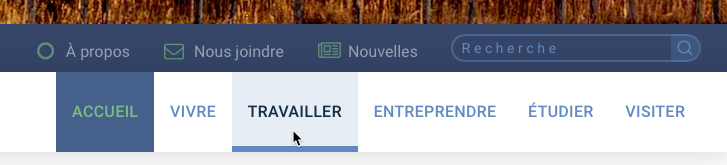
As you can see in the image below the current page state for the pages that you can access with the second bar should display like the «Travailler» menu item where the cursor is.

Hi There,

Please try to remove those custom CSS and then add this JS code instead:
setInterval( function() { jQuery( '.current-menu-item a' ).each( function() { jQuery(this).addClass('x-interactive'); jQuery(this).parent().find('a > span > span').addClass('x-active'); } ); }, 300);

We have confirmed that the active state on the theme is not currently added that’s why it doesn’t have the same colors or style with the hover state. The code will add the correct class and then from there it can get the correct styles. We have forwarded this already to our developer and that code is a temporary fixed.

Hope this helps.

1 Like

Problem fixed. Thank you Lely.:grinning:

Glad we could help.

Cheers!

This topic was automatically closed 10 days after the last reply. New replies are no longer allowed.