Css to only part of the text in classic element

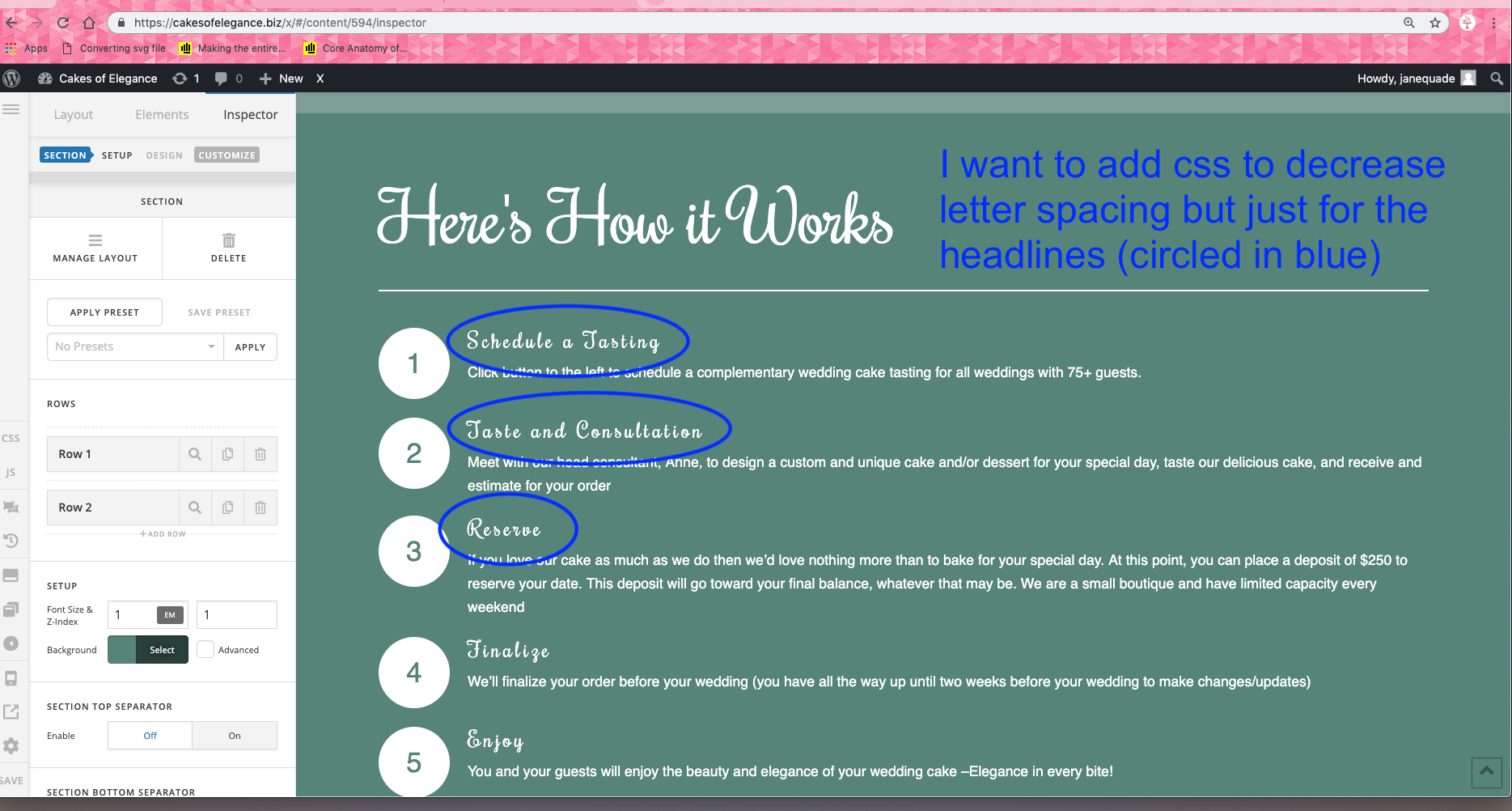
I want to add css to decrease letter spacing but just for the headlines (circled in blue) on the attached screenshot.

I’m using a classic element and can’t figure out how to apply the css to just part of the text –the headlines.

or, is there a way to use a new element to achieve the same look with the numbered animated icons to the left of the text?

Thanks in advance.

jane
So sorry. i just figured it out while working on another website.
for anyone else i’ll post my fix.

Theme Options > Typography > Headings
Decrease H4 LETTER SPACING

Hi Jane,

Glad you have figured it out. Yes that works. But that would be sitewide. It will affect all h4 in the site. In case you only want to apply this changes for this specific element, we can try custom CSS.
On that page custom CSS try adding this:

h4.x-feature-box-title {
    letter-spacing: .03em; /*Adjust to your preferred spacing*/
}

See this screencast on how I have selected current selector for the headline: https://screencast-o-matic.com/watch/cqeY6H0GxY

Hope this helps.

You are correct. Thanks for the info. You always go the extra mile.

You’re most welcome @janequade! :slight_smile:

This topic was automatically closed 10 days after the last reply. New replies are no longer allowed.