CSS styling problem

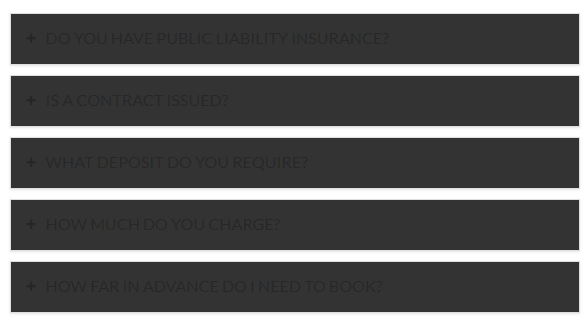
For some reason I have lost some of the styling on a elements of my site such as the buttons (red but should be black - on homepage) www.mindgamemagic.co.uk and my accordion (dark grey text, but should be white - contact page).

I looked in the customise theme options, but these colours are not there so I’m assuming there is an issue somewhere else. Can any one help? Thanks

Hi there,

Thank you for reaching out to us. I checked your page and the it looks like you’ve customized the elements in Cornerstone which is overriding the global settings. Please check your Cornerstone’s styling for your elements that have issues to fix the problem.

Hope this helps!

Thanks for getting back to me! I can’t see any CSS in cornerstone elements, but I have managed to change the button colours adding in CSS in cornerstone.

I’m trying to do the same for the accordion, but struggling to identify the CSS I need to add the change the heading color for each accordion item - do you have any idea? Much appreciated.

Hi There,

You can try adding this custom CSS:

.x-acc .x-acc-header-text,
.x-accordion-heading .x-accordion-toggle {
    color: #ccc2c2;
}

Let us know how it goes!

This topic was automatically closed 10 days after the last reply. New replies are no longer allowed.