CSS Gradient Overlay on top of video

Hi, I’ve looked at a few other similar support pages on this topic but nothing worked for me. I’m trying to overlay this CSS on top of a video that I’m using in the “Background Lower Layer”.

background: transparent linear-gradient(257deg, var(–dark-purple-bg) 0%, #24182FC4 100%) 0% 0% no-repeat padding-box;

background: transparent linear-gradient(257deg, #35224500 0%, #24182FC4 100%) 0% 0% no-repeat padding-box;

opacity: 1;

However, the video appears ON TOP of the gradient background, and thus does not show. How do I make the video show underneath the gradient? Here is the example in the header hero area: https://dev.treasurevalleyplanning.com/
Hello @calebja,

Thanks for writing to us.

To get video gradient overlay you need to follow these steps.

  1. Go to the Cornerstone page builder section, add a custom CSS

Members-Content-Pro

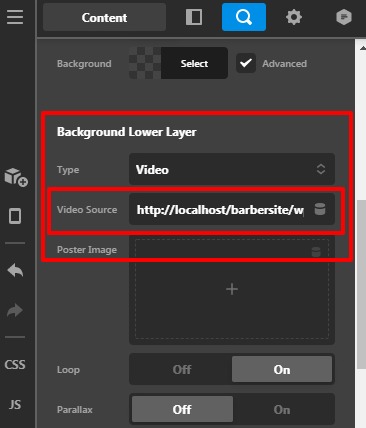
  1. Add your video in the Background Lower Layer by section “Video” option

Members-Content-Pro

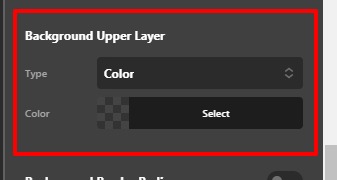
  1. Set the background color as transparent in the Background Upper Layer by selecting the “color” option.

Members-Content-Pro

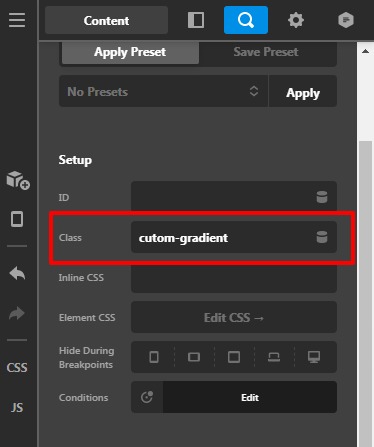
  1. Now we need to override the style of the Upper Layer background color with a gradient style. For that we need to add custom CSS code by selecting our custom class.

Code would be like this

.cutom-gradient .x-bg-layer-upper-color {
    background: transparent linear-gradient(257deg, var(–dark-purple-bg) 0%, #24182FC4 100%) 0% 0% no-repeat padding-box;
    background: transparent linear-gradient(
257deg
, #35224500 0%, #24182FC4 100%) 0% 0% no-repeat padding-box;
}

Please feel free to change the class name as per your need. Please note that you need to change the class name in the code as well in case if you change the class name for the section as shown above screenshot.

The purpose of providing the custom CSS to show you how to add CSS code to your site. Writing custom CSS is outside the scope of our theme support. If you need more customization, you need to learn CSS and learn how to use the browser’s element inspector.

Hope it helps.
Thanks

This topic was automatically closed 10 days after the last reply. New replies are no longer allowed.