CS-Forms | DropDown Placeholder

Hi there,

how can I specify a placeholder for a dropdown field?
Or maybe a preselected option “Please choose”, which at the end is not valid to have selected?

But the placeholder for the dropdown would definitely be the better option. It this possible or is there a workaround

Thanks!

Hello @xoa,

Thanks for writing in!

You can have a dedicated option for that like this example:
image

Which will also display this:
image

Hope this helps.

Thanks for getting back to me. But I want “Please choose” not to be selectable by the user or if not possible, maybe a error upon submitting the form.

EDIT: Ok, I think I might have found the solution. You have to choose “Disabled” and “Selected” for that option. It just didn’t show correctly in the Editor.

Hey @xoa,

Yes, you will have to disable that option.
image

And make it also your default value:

Thanks.

Ok, thanks.
And now - how to get all countries in my drop-down without creating every single option manually?

Hello @xoa,

At the moment, CS Forms doesn’t include a built-in country dropdown field. Implementing this functionality would require custom development, which is outside the scope of our support. If you’d like to add this feature, we recommend working with a developer or subscribing to One , where customization questions are supported.

We’ll also pass your suggestion along to our development team for consideration as a future feature request. While we can’t guarantee if or when it will be implemented, we appreciate you taking the time to share your idea.

Thanks for understanding

This would be very useful. I think tools like Pods have built in country/region/state and province lists. +1 for adding this to CS Forms.

Thanks for your vote, @JvP

@prakash_s
I think a dedicated Address field and Phone number field (with country flags and correct formatting for each country) should not miss in any form builder.

I strongly hope we will see those fields in the near future. :relaxed:

How to get rid of the empty space of “Row Alter Kinder” when “Kinder” = “Keine”? The fields are hidden by input condition, bu the gap still remains.

Hey @xoa,

The whitespace is coming from the empty columns. To get rid of this, you should add a condition to the Row element.
image

The Condition:
{{dc:form:data key="Kinder"}} is not Kiene

Kindly let us know how it goes.

Hey, thanks for your reply. Have you tried it?
I did, but unfortunately it does not work.

EDIT:

I now also added a Headline “Lable Alter Kinder” and added a condition there to hide the label when Kinder = Keine, but also that is not working. The label is always there.

Hello @xoa,

To help you with your concerns, we need to check your settings. I would request please share the admin login details. Please share your details in a secure note. Please provide the following details

  • WordPress Login URL
  • Admin-level username and password
  • Exact page URL

You can find the Secure Note button at the bottom of your posts

Thanks

I attached the secure note.

Hey @xoa,

Yes, you are correct that it does not work the way you want it. The “{{dc:form:data key="Kinder"}} is not Kiene” condition works only when submitting the form.

I have inspected your Form layout thoroughly, and here’s what I would suggest to minimize the white space as if there are no field rows in the area.
1.) Remove the Top Margin of the “Kontaktdaten” row.

2.) Add a Bottom Margin to each of the sub-select elements instead.
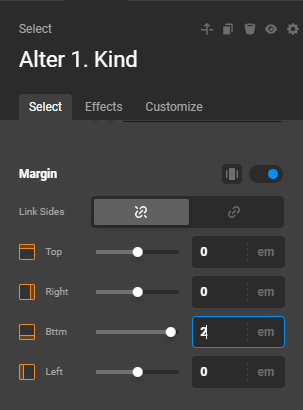
image

With it this way, the Row element occupies only 1 pixel of height when no dropdowns are visible. As soon as you select “1” or any number in the Kinder column above, the “Row Alter Kinder” Row element expands.

Check the page now as I demoed the steps above.

Cheers.
