CS Forms ACF Post Update Action

Hi,

I am building a form in CS Forms and am having difficulty with an ACF Post Update action in my Action Group. My set-up is like this:

  • Email Action
  • Post Create
  • ACF Post Field Update
  • Redirect

Steps 1 and 2 work fine. Step 3 (updating ACF) fails, which in turn fails the redirect. I am pretty sure it is to do with the ACF Post Field Update settings not being quite right:

  • Field - {{ acf.post_field({“field”:“business_description”,“post”:""}) }}
  • Data - {{ form.data({“key”:“business_description”}) }}
  • ID Selector - {{ form_action.response({“depth”:“1”}) }} - I have also tried without the depth

Do you have any guidance on where I am going wrong? The above is a simplified action group chain, as I have about 10 ACF Post Field Updates in total.

Thanks,
Christopher

Hello Christopher,

Thanks for posting in! You may be targeting the incorrect ID of the post where you are trying to update the ACF Post field. We would be happy to double-check your site if we can log in. You can create a secure note in your next reply with the following info:
– Link to your site
– WP login URL
– WP username
– WP password
– WP Administrator Role
– Confirmation that we can access and make changes to your site

To know how to create a secure note, please check this out: How The Forum Works

image

Best Regards.

Hi @ruenel,

I am aware the ID is likely to be the issue. The documentation is quite basic on this sort of thing!

Details in SN.

Thanks,
Christopher

Hello @whitemedia,

You must understand that when the Post Create action is triggered, a unique ID is automatically generated for the new Village Business CPT. You will need this ID when you trigger the ACF Field Update. Your {{ form_action.response({“depth”:“1”}) }} will not give you anything. If I am gonna do this, I will be running a looper to get the ID of the newly created CPT item. My action group will look like this:

Action Group
   Email Action
   Post Create 
   Action Group [Looper Provider Recent Post / Looper Consumer {ONE} ]
      ACF Post Field Update OR
      Post Meta Update

With the looper, I can easily target a specific CPT item and update the ACF Field or Post Meta.

Hope this makes sense.

Hello @ruenel,

Thank you for the clarification. It makes sense. I have managed to get the form working, but not in the way intended. It works fine with a PHP Action, but not with an ACF Post Field Update Action.

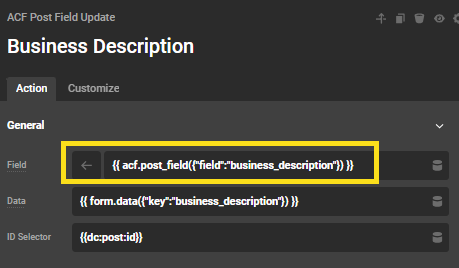
The problem is related to the Field content. A number of my ACF fields do not appear in the dropdown selector and if I add the field using Specific Field in the dropdown options - {{ acf.post_field({"field":"business_description"}) }} - the ACF field is never updated.

The PHP Action code, which successfully populated the ACF field is as follows 9it includes some debugging):

$post_id = get_the_ID();
$description = $formData['business_description'];

error_log('PHP Action - Post ID: ' . $post_id);
error_log('PHP Action - Description: ' . $description);

$result = update_field('business_description', $description, $post_id);
error_log('PHP Action - update_field result: ' . var_export($result, true));

Am I doing something wrong with the field setting?

image

Thanks,
Christopher

Hey Christopher,

Instead of {{dc:acf:post_field field="business_description"}}, try inputting business_description only. If that doesn’t work, try this {{dc:form:data key="business_description"}}.

Hi Christian,

Thanks for the advice. Something strange has happened. In the Field dropdown list, yesterday and the day before, I only had 2-3 options available. That is why I was using the DC control.

Today, I briefly had all 10+ ACF fields for this post type visible and selecting business_description from the list worked perfectly! As soon as I started to use the dropdown for other fields, the list was restricted to just business_description again.

The page is now in production, so I have used the fully functional PHP Action solution and will have to revisit the ACF Action on a different website.

Good to hear that @whitemedia.

This topic was automatically closed 10 days after the last reply. New replies are no longer allowed.