Creative CTA Size Edit

Hi,

I am trying to edit the size of my creative CTA button. When I adjust the width, it becomes shorter, but it aligns to the left. May I know how I can make it align to the center of the content area?

Will you also be able to advise on how I can adjust the height, to make it a reasonable size regardless of screen size? I tried out the settings but am unable to create a nice looking button. Am not a programmer, so am unsure how best to proceed with this.

Thank you.
Hi @bentkieran,

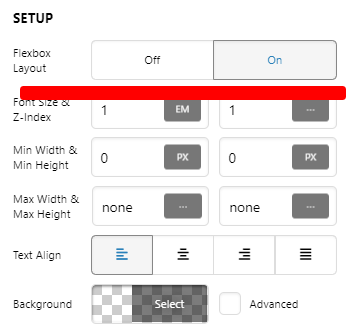
You can center it via Columns Settings. Set Flexbox Settings to ON:
Home_Content_Pro (5)
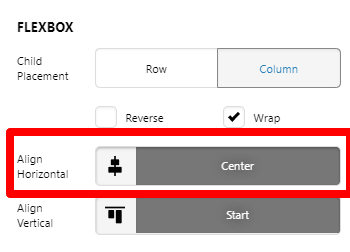
Then Align Horizontal to Center
Home_Content_Pro (6)

See this: https://screencast-o-matic.com/watch/cYhY1tkpNd

If you have another content on the same section where you don’t want it center, you can put them on another ROW, or you may add ROW element inside that column so you can align it differently.

This topic was automatically closed 10 days after the last reply. New replies are no longer allowed.