Hi there,
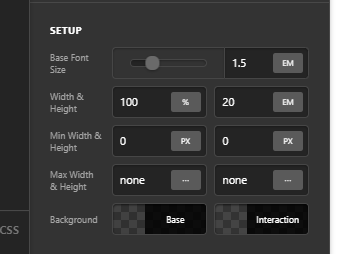
I’d like to know how I can get the Creative CTA element in Cornerstone/Pro to automatically adjust its height to the contents of the text. I’m implementing something where the Primary Text fields contain very little text, but the Interaction Text has a lot more content.
Because the Interaction Text has position:absolute; in CSS even when I set height: auto; for the CTA element, it doesn’t adjust its height to accommodate the extra content in the Interaction Text. As a result, when hovering over the element, the content overflows but is cropped out of view.
How can I make the Creative CTA adjust its height to the Interaction Text content?
Thank you!